Let’s start with the conclusion most guides bury at the bottom: you, a retail trader at home, almost certainly cannot run true high-frequency trading. Not because you’re not smart enough, but because HFT is an arms race won with nanoseconds, custom hardware, and real estate inside exchange data centers. Understanding it still matters enormously, though — because these are the systems on the other side of many of your trades, and knowing how they work makes you a sharper trader.
This is a clear-eyed tour of the major high-frequency trading strategies: what they are, how they make money, and exactly where the line sits between what institutions do and what a retail trader can realistically touch.
High-frequency trading (HFT) is a form of algorithmic trading defined by extreme speed and volume. Thousands of orders are placed, modified, and cancelled in fractions of a second. The holding period for a position can be milliseconds. The goal isn’t to predict where a stock goes next week. It’s to capture vanishingly small edges, billions of times, faster than anyone else.
And it dominates. As VT Markets explains, HFT firms account for an estimated 50–60% of total US equity trading volume in 2026. When you buy a share, there’s a strong chance an HFT system is on the other side. These aren’t fringe players — they are the plumbing of modern markets. That scale is why understanding high-frequency trading strategies is worthwhile even if you’ll never run one.
How HFT took over the markets
HFT didn’t always rule. In the 1990s, trading was still mostly human. Then exchanges went electronic. Orders that once took seconds now took milliseconds.
The 2000s lit the fuse. Regulation pushed US markets toward electronic, fragmented venues. That fragmentation created tiny price gaps between exchanges. Fast firms raced to capture them. Speed itself became a product you could buy.
By the 2010s, the arms race was in full swing. Firms spent fortunes on faster cables and closer servers. One company famously laid a straighter fiber line between Chicago and New York just to shave a few milliseconds. The book Flash Boys then brought the whole practice to public attention.
Today the trend has only deepened. HFT is the market’s backbone, not its fringe. The edges are smaller, the hardware more extreme, and the competition fiercer. Speed that cost millions a decade ago is now table stakes. That history is why a retail trader can’t simply “start” high-frequency trading. You’re not picking up a strategy. You’re stepping into a thirty-year infrastructure war.
Market making: the dominant strategy
The most prevalent of all high-frequency trading strategies is electronic market making. The idea is old; the speed is new.
A market-making firm simultaneously posts both a buy order (the bid) and a sell order (the ask) for a security, then profits from the tiny spread between them. Buy at the bid, sell at the ask, capture the difference, repeat at enormous scale. In doing so, these firms provide liquidity — they’re standing ready to take the other side of trades, which keeps markets functioning smoothly.
The edge per trade is microscopic, often a fraction of a cent. The profit comes from doing it across thousands of securities, millions of times a day. It’s a volume business built on speed and inventory management, not on any single brilliant prediction.
Statistical arbitrage
Statistical arbitrage hunts temporary pricing inefficiencies between related securities. Think of a stock and the index fund that holds it, or the same stock listed on two different exchanges.
When the historical price relationship between two such instruments drifts out of line, the algorithm bets it will snap back. It buys the cheap one, sells the rich one, and profits as the relationship reverts. The HFT twist is speed. These dislocations exist for a heartbeat, so the system must detect and act before the gap closes. It’s the same mean-reversion logic retail quants use, run at a pace no human could follow.
Latency arbitrage
Latency arbitrage is the most controversial entry on this list, and the one that most directly involves retail infrastructure. It exploits the speed difference between a fast data feed and a slower one.
Here’s the mechanism. A fast feed receives a price update — say from a big institutional order or a news event. Software detects that a slower broker’s quote hasn’t caught up yet. It then places an order at the stale price before that broker updates, profiting from the difference. The execution window is typically 50–200 milliseconds, with a profit of roughly 0.5–3 pips per trade after spread. It’s pure speed arbitrage, capturing the lag between who knows the new price first.
Momentum ignition
Momentum ignition is the most aggressive — and legally fraught — strategy on this list. The concept: trigger a rapid price move, often by firing a burst of orders, to induce other algorithms to pile in, then profit from the move you helped create.
Because it can shade into market manipulation, momentum ignition sits in a gray-to-black legal zone and draws regulatory scrutiny. We include it for completeness and understanding, not endorsement. Knowing it exists helps explain some of the sudden, inexplicable spikes you’ll occasionally see on a chart.
The technology arms race
Here’s why retail can’t simply join in. By 2026, the competitive standard requires latency measured in nanoseconds to microseconds — and achieving that takes a stack most individuals can’t assemble:
FPGAs and custom hardware that process market data in dedicated silicon rather than general-purpose code.
Co-location — physically placing your servers inside or beside the exchange’s data center to cut the distance light has to travel.
Direct market-access feeds that bypass the slower retail data pipelines entirely.
Teams of specialized engineers and quants maintaining it all.
This is an infrastructure war measured in the speed of light through fiber. The barrier isn’t intelligence — it’s millions of dollars of equipment and physical proximity to the exchange.
Can retail traders use high-frequency trading strategies?
The honest answer: not true HFT. You cannot out-spec a firm with FPGAs co-located at the exchange, and trying to compete on raw latency is a guaranteed way to lose.
But the logic behind several of these strategies scales down. You can run market-making-style bots on some crypto exchanges, capturing spread without nanosecond speed. You can run statistical-arbitrage and mean-reversion strategies on longer timeframes where milliseconds don’t decide the outcome. The trick is to borrow the idea while competing on a timeframe where speed isn’t the edge — minutes or hours, not microseconds. That’s a game retail can actually play.
What you should not do is buy a product promising retail “HFT” returns. Genuine high-frequency trading strategies are inseparable from infrastructure you don’t have, and anyone selling otherwise is trading on the word’s mystique.
Are high-frequency trading strategies good or bad for markets?
This is one of the most debated questions in modern finance, and the honest answer is: both, depending on the strategy.
On the positive side, market-making HFT provides genuine liquidity. It narrows spreads and makes it easier to buy or sell instantly at a fair price. When you get a near-instant fill on a liquid stock at a tight spread, high-frequency trading strategies are part of why. For the everyday investor, that’s a real, if invisible, benefit.
On the negative side, critics point to fragility. HFT liquidity can vanish in an instant during stress, deepening “flash crash” events where prices gap violently in seconds. And strategies like momentum ignition shade into manipulation, extracting value rather than adding it. Latency arbitrage, too, profits purely from being faster than someone else, which many see as a tax on slower participants rather than a service.
The balanced view is that HFT made markets cheaper and more liquid in normal times, while adding new forms of instability in abnormal ones. Regulators continue to wrestle with that trade-off. For you, the practical point is simpler: these systems are a permanent feature of the landscape, so the goal is to trade in a way that doesn’t depend on beating them.
What high-frequency trading strategies mean for you
Even if you never run one, HFT shapes the market you trade in. Two practical takeaways:
First, don’t compete on speed. Your edge as a retail trader is patience, flexibility, and timeframes the giants ignore — not reaction time. Trying to scalp micro-moves against HFT market makers is bringing a stopwatch to a photo finish.
Second, expect the plumbing. Tight spreads on liquid stocks exist partly because market makers compete them down — a benefit to you. But sudden liquidity vanishing in a panic, or strange momentary spikes, often trace back to these systems too. Understanding the machinery makes its behavior less mysterious and your own decisions calmer.
The bigger lesson is one of mindset. High-frequency trading strategies win by being the fastest. You never will be, and you don’t need to be. Retail traders thrive on the timeframes the giants ignore — the hours, days, and weeks where a good idea, not a fast cable, decides the outcome. Cede the microseconds without a fight, and play the game where your patience, not your hardware, is the edge. That is a contest a disciplined retail trader can actually win.
FAQ
What are the main high-frequency trading strategies? The major ones are market making (the most common), statistical arbitrage, latency arbitrage, and momentum ignition — the last of which raises serious legal concerns.
Can a retail trader do high-frequency trading? Not true HFT. It requires nanosecond latency, FPGAs, and co-location at the exchange. Retail traders can borrow the underlying logic on slower timeframes where speed isn’t the edge.
How much of the market is high-frequency trading? HFT firms account for an estimated 50–60% of total US equity trading volume in 2026, making them dominant participants.
Is high-frequency trading legal? Most HFT is legal and even provides liquidity. Momentum ignition is the exception — it can constitute manipulation and draws regulatory scrutiny.
Is latency arbitrage a threat to retail traders? It mainly exploits speed gaps between professional feeds and slower brokers. As a retail trader, the practical lesson is simply not to compete on speed against systems built for it.
Why is high-frequency trading so controversial? Because it cuts both ways. Market-making HFT adds liquidity and tightens spreads, which helps ordinary investors. But that liquidity can vanish in a crisis, and tactics like momentum ignition shade into manipulation. Regulators still debate the balance.
Key takeaways
True high-frequency trading strategies are an institutional arms race — won with FPGAs, co-location, and nanosecond latency.
The four major strategies are market making, statistical arbitrage, latency arbitrage, and momentum ignition (the last legally fraught).
HFT is 50–60% of US equity volume — it’s the market’s plumbing, not a fringe activity.
Retail can’t run true HFT, but can borrow the logic on slower timeframes where speed isn’t the deciding edge.
Don’t compete on speed. Your retail edge is patience and timeframes the giants ignore.
Want to trade smart against the machines, not race them? Our free Algo Trading Starter Kit includes strategy templates built for retail-friendly timeframes, a backtesting checklist, and our broker comparison. Grab it free → and play the game you can actually win.
“Set it and forget it.” That phrase sells more trading bots than any backtest ever could. The fantasy is intoxicating: flip a switch, walk away, and watch money trickle in while you sleep. So let’s be honest from the first line — none of these passive income trading strategies are truly hands-off, and anyone who tells you otherwise is selling something. What they can be is low-effort once set up correctly, which is a different and far more achievable promise.
This guide ranks six automated approaches by how genuinely passive each one is, explains how it makes money, and flags the work it still quietly demands. Think of “passive” as a spectrum, not a switch.
Here’s what the marketing skips: a bot automates execution, not judgment. It will place orders all night without you. It will not notice that the market regime changed, that your strategy stopped working, or that it’s time to switch off. That part is still your job.
As multiple 2026 bot reviews stress, you can’t simply “set it and forget it.” A strategy that printed money last month may bleed this month, so the genuinely successful operators review their bots, adjust parameters, and turn them off at the right moments. The realistic goal of passive income trading strategies isn’t zero effort — it’s converting hours of active screen-watching into minutes of weekly oversight. That’s still a fantastic trade. Just go in with clear eyes.
How we ranked these passive income trading strategies
We ranked the six on a single axis that matters most to you: how truly hands-off each is once running, balanced against how reliably it generates income. A strategy that needs daily babysitting scores low on “passive,” no matter how clever. Among passive income trading strategies, the most hands-off options sit at the top; the most demanding at the bottom.
At a glance: the passive-ness ranking
Strategy
How passive
Profits from
Main risk
DCA bots
Very high
Long-term accumulation
Buys through downtrends
Index / rebalancing
Very high
Diversified market growth
Market-level returns only
Grid bots
Medium-high
Sideways oscillation
Strong breakouts
Trend-following
Medium
Sustained trends
Choppy whipsaws
Copy trading
Medium
A leader’s skill
Leader’s drawdowns
Arbitrage
Low
Cross-market gaps
Thin margins, upkeep
#1 DCA bots — the most hands-off
Dollar-cost averaging bots buy a fixed amount of an asset on a fixed schedule, ignoring price entirely. Over time, this smooths out volatility — you buy more when prices are low and less when they’re high, automatically.
It’s the closest thing to genuinely passive on this list because there’s almost nothing to tune. You’re not timing anything; you’re systematically accumulating. As the bot reviews note, DCA bots are especially effective for people who want a simple, automated buy-low-on-average approach without advanced knowledge.
How passive: Very. Set the amount and schedule, then review monthly. The catch: It accumulates through downturns too, so it suits assets you believe in long-term — not anything you’d panic over.
#2 Grid trading bots
A grid bot places a ladder of buy orders below the current price and sell orders above it. Each time price oscillates through the range, it banks a small profit. It’s a favorite for sideways, choppy markets.
Once configured, a grid bot runs itself for days — solidly in passive territory. But it carries a real risk: a strong breakout out of your range leaves it accumulating losses on one side. Our full grid trading strategy guide covers the mechanics and the all-important stop-loss.
How passive: Fairly. Runs unattended, but needs a sensible range and a stop. The catch: A strong trend breaks the grid. It wants chop, not conviction.
#3 Trend-following bots
A trend-following or momentum bot rides established trends — buying strength, exiting weakness — using simple rules like a moving-average crossover. It aims to capture the bulk of a big move and sidestep the worst crashes.
It’s reasonably passive: the rules are mechanical, and the bot trades infrequently compared to a scalper. The trade-off is whipsaws — in choppy markets it gets chopped up with small losses, the mirror image of where a grid thrives.
How passive: Moderately. Infrequent trades, but benefits from occasional review. The catch: Sideways markets cause repeated small losses.
#4 Copy trading
Copy trading lets you automatically mirror the trades of an experienced trader. Platforms like Zignaly built entire profit-sharing ecosystems around it. You’re outsourcing the strategy itself to someone with a track record.
It can be very hands-off — once you’ve chosen who to follow, the trades happen automatically. But the passivity is deceptive. Your returns are only as good as the trader you copied, and even strong traders have losing streaks. Choosing and monitoring who you follow is the work that replaces strategy-building.
How passive: Hands-off to run, but choosing and vetting traders is ongoing. The catch: You inherit someone else’s drawdowns and decisions.
#5 Index and rebalancing bots
These bots hold a basket of assets at target weights and automatically rebalance — trimming winners and topping up laggards — to maintain the allocation. It’s a disciplined, low-touch way to stay diversified.
The income here is long-term and steady rather than active trading profit, which makes it genuinely low-maintenance. It won’t shoot the lights out, but it won’t demand much either.
How passive: Very. Rebalancing runs on a schedule. The catch: Returns track the market, so don’t expect outsized gains.
#6 Arbitrage bots — least passive
Arbitrage bots exploit price differences for the same asset across exchanges. In theory it’s market-neutral income; in practice it’s the least passive option here.
Edges are thin and fleeting, fees and transfer times eat them, and staying competitive demands constant monitoring and infrastructure. It’s powerful for technically capable operators but a poor fit for anyone seeking a quiet, hands-off income.
How passive: Barely. Demands monitoring, speed, and upkeep. The catch: Thin margins and high technical overhead.
Crypto vs stocks: where these strategies fit
The market you choose shapes which passive income trading strategies make sense.
Crypto runs 24/7 and swings hard, which suits grid and DCA bots especially well. There’s always movement to harvest, and no market close to interrupt the bot. The no-code ecosystem — Pionex, 3Commas, Bitsgap — is also most mature here. The cost is sharper volatility and lighter regulation, so conservative position sizing matters more.
Stocks and ETFs move slower and rest overnight and on weekends. That favors trend-following and index/rebalancing bots over high-frequency oscillation. The upside is stronger regulation and decades of clean data for testing. The 2026 removal of the $25,000 day-trading minimum also made automated equity strategies viable on smaller accounts.
Most beginners start in crypto for its accessibility and round-the-clock action, then add equity strategies as they grow. Neither is strictly better. Match the market to the strategy — and to how much volatility you can comfortably sleep through.
The maintenance nobody mentions
Whichever you choose, budget for the recurring work that keeps “passive” income alive:
Regime checks. Confirm the strategy still fits current market conditions — grids want chop, trend bots want trends.
Performance review. Compare live results to expectations and kill what’s clearly broken.
Risk hygiene. Verify stops, position sizes, and that no single position has ballooned.
The off switch. The most underrated skill is turning a bot off when its market disappears.
Do this for fifteen minutes a week and you’ve earned the “passive” label honestly. Skip it, and the market eventually collects what you ignored.
What can these strategies realistically earn?
This is where expectations need an anchor. Ignore the screenshots of triple-digit months — they’re survivorship bias at best, fabrication at worst.
Realistic returns from passive income trading strategies land in the same range as other disciplined automated approaches: roughly single digits to the low double digits annually for most retail operators, in good conditions. A well-run grid bot in a choppy market or a steady DCA accumulation can compound respectably over time. But none of these are money printers, and all of them have losing stretches. As honest bot reviews repeatedly note, no platform can promise guaranteed returns, and any that does is a red flag.
The mindset that works: treat this as a way to make your capital work a little harder with a little oversight, not as a salary replacement you can switch on overnight. The people who succeed with passive income trading strategies are the ones who size expectations correctly. They compound modest, real returns instead of chasing fantasy ones — and they never risk money they can’t afford to lose on the promise of “passive.” Anchor your expectations there, and these strategies become a genuine asset that quietly works in the background, rather than a disappointment waiting to happen — and a far better use of idle capital than letting it sit untouched.
How to start with passive income trading strategies
Match the strategy to your assets and temperament — DCA for long-term conviction, grid for sideways markets, copy trading if you’d rather outsource.
Use a reputable platform (3Commas, Pionex, Bitsgap) or code your own.
Paper trade first, then start with capital you can afford to lose.
Schedule a weekly check-in from day one — it’s the habit that separates real income from slow bleed.
FAQ
Are passive income trading strategies actually passive? Not entirely. Bots automate execution, not judgment. The realistic goal is low-effort — minutes of weekly oversight instead of hours of active trading — not zero effort.
Which strategy is the most hands-off? DCA bots, followed by index/rebalancing bots. Both run on a schedule with little to tune, making them the closest to genuinely passive.
Can I lose money with these bots? Yes. Grid and DCA bots can lose in strongly adverse markets, copy trading inherits the leader’s losses, and no honest platform promises guaranteed returns.
Do I need coding skills? No. Most of these run on no-code platforms like Pionex, 3Commas, and Bitsgap. Coding only helps if you want to customize a strategy.
How much time do they really take? Plan for roughly fifteen minutes a week of review — regime checks, performance, and risk hygiene. That light upkeep is what keeps the income flowing.
Which markets suit passive income bots best? Crypto suits grid and DCA bots thanks to 24/7 volatility and mature no-code platforms. Stocks suit trend-following and rebalancing bots, with stronger regulation and deeper data for testing. Many traders eventually run both.
Key takeaways
No passive income trading strategies are truly hands-off — bots automate execution, not judgment.
DCA and index/rebalancing bots are the most passive; arbitrage is the least.
Grid and trend bots sit in the middle — low-touch, but each has a market it hates (trends and chop, respectively).
Copy trading outsources the strategy but not the responsibility of choosing well.
Budget ~15 minutes weekly for regime checks and risk hygiene — that’s the price of keeping “passive” income alive.
Want a low-effort income setup that won’t blow up? Our free Algo Trading Starter Kit includes a strategy-matcher quiz, a weekly-review checklist, and our vetted platform comparison. Download it free → and build income you can actually walk away from — for a week, at least.
Somewhere right now, a piece of software is opening and closing a Bitcoin position in under a second, pocketing a fraction of a percent, and doing it again. And again. Hundreds of times a day. That’s a crypto scalping bot at work — and it’s one of the most seductive ideas in automated trading. Tiny wins, stacked endlessly, into something big. The dream sells itself.
The reality is more demanding. A crypto scalping bot can absolutely make money, but the margin between profit and loss is razor-thin, and it’s decided by two unforgiving forces most beginners ignore: fees and latency. This guide shows you how scalping actually works, walks through the brutal math, and tells you honestly what it takes to come out ahead.
Scalping is the art of taking many small profits instead of a few big ones. A scalper doesn’t care where Bitcoin will be next month. It cares where the price will be in the next thirty seconds, and it tries to capture a sliver of that move — 0.2%, maybe 0.5% — before exiting and hunting the next one.
Crypto is a natural home for this. It trades 24/7, it’s volatile, and its order books update constantly, so there are always tiny dislocations to exploit. No human can scalp effectively, though. The trades are too fast and too frequent. This is automation’s territory by necessity, not preference, which is exactly why the crypto scalping bot exists.
How a crypto scalping bot works
Strip away the marketing and every crypto scalping bot runs the same tight loop, just very fast:
Ingest data. Stream live order-book and price data from the exchange.
Generate a signal. Apply a rule — an order-book imbalance, a micro-breakout, a short moving-average cross — to decide whether a quick edge exists.
Send the order. Fire the entry the instant the signal triggers.
Exit fast. Take the small profit at a preset target, or cut the loss just as quickly.
Apply risk checks. Cap position size and daily loss so one bad tick can’t wreck the account.
A scalper bot may execute dozens or hundreds of trades per day this way. That frequency is the whole point — and also the whole problem, because every single trade pays a toll.
The brutal math of fees
Here is the part the “1% a day!” screenshots never show you. When you trade hundreds of times a day, fees stop being a footnote and become the main character.
Consider this: a reasonably good scalping strategy wins about 60% of its trades. Sounds healthy. But research summarized by TradingView Hub found that paper returns of around 1% per day shrink to roughly 0.2% per day in live trading once you subtract exchange fees and spread — an 80% collapse between simulation and reality. The strategy didn’t change. The costs simply ate four-fifths of the edge.
It gets starker. A CoinMetrics analysis found that only about 12% of micro-spread trading opportunities are actually profitable once fees and latency are accounted for. Eighty-eight percent of the “edges” a naive bot sees are mirages that vanish at the cash register. For a scalping bot, fee structure isn’t a detail — it’s the strategy.
Why latency makes or breaks you
The second killer is speed. Scalping profits live in a window measured in milliseconds, and if you’re slow, the window slams shut before you get through it.
The numbers are unforgiving. When targeting 0.2–0.5% moves, profit margins on micro-spread trades vanish entirely above 200 milliseconds of latency. For reference, human reaction time is 200–250 milliseconds — meaning a human is, by definition, too slow to scalp at all. A competent crypto scalping bot executes in 5–50 milliseconds, and that gap is its entire reason to exist.
This is why where and how your bot runs matters as much as its logic. A bot on a laggy home connection routing through a slow API is bringing a knife to a gunfight against systems co-located beside the exchange.
A worked example
Let’s make the math concrete. Suppose your bot targets a 0.30% move per trade on a futures pair.
Gross target: 0.30% per winning trade.
Fees: using futures maker orders at 0.02% per side, a round trip costs about 0.04%.
Net per win: roughly 0.26%.
Losses: on a losing trade you give back your stop, say 0.30%, plus the same 0.04% in fees.
Now apply a 60% win rate over 100 trades: 60 wins at +0.26% and 40 losses at −0.34%. That nets out to roughly +2.0% across the 100 trades — genuinely good.
But flip one variable. Use taker orders at 0.05% per side instead of maker, and the round-trip fee jumps to 0.10%. Suddenly each win nets only 0.20% and each loss costs 0.40%, and the same 100 trades barely break even. One fee setting flipped a winner into a coin toss. That sensitivity is the essence of scalping.
What it takes to actually profit
Put the pieces together and a profitable crypto scalping bot needs a specific, demanding combination:
A genuine edge — a signal with a win rate of at least 57–60%, validated out-of-sample, not curve-fit to last month.
Maker-order fees — using limit orders that add liquidity (around 0.02%) instead of taker orders that remove it.
Low latency — execution well under 200ms, ideally in the tens of milliseconds, via a fast connection or a cloud server near the exchange.
Strict risk control — tight per-trade stops and a hard daily loss limit, because high frequency means errors compound fast.
The right market phase — scalping suits liquid, volatile, ranging conditions and struggles in dead or violently trending markets.
Miss any one of these and the math quietly turns against you. This is not a “set it and forget it” strategy.
Where a crypto scalping bot wins and loses
Matching the bot to conditions is half the battle.
It wins when: the market is liquid and choppy, spreads are tight, volatility is steady, and your execution is fast. High-liquidity majors like BTC and ETH on a low-fee futures venue are the classic playground.
It loses when: liquidity is thin (slippage explodes), the market is dead (no moves to capture, but fees still accrue), or a violent one-way trend runs your quick exits over. Thin altcoins are especially dangerous — the spread alone can exceed your profit target.
The honest summary: scalping is the strategy most sensitive to costs and conditions. When everything aligns, it’s beautiful. When it doesn’t, it bleeds quietly.
Common crypto scalping bot mistakes
Most scalping failures come from the same handful of errors. Avoid these and you’ve dodged the majority of blown accounts.
Trading taker fees. Paying to remove liquidity instead of using maker limit orders can double your costs and flip a winner into a loser. On a high-frequency strategy, the fee tier is not optional.
Backtesting without costs. A backtest that ignores fees, spread, and slippage will always look brilliant and always lie. Model every cost before believing a single result.
Scalping illiquid altcoins. Thin order books mean wide spreads and ugly slippage. On a low-cap token, the spread alone can exceed your entire profit target.
Ignoring latency. Running a crypto scalping bot on a slow home connection guarantees you arrive after the edge is gone. Measure your real latency before going live.
No daily loss limit. At hundreds of trades a day, a malfunctioning strategy can bleed fast. A hard daily stop is the circuit breaker that saves the account.
Over-optimizing the win rate. Tuning parameters until the backtest hits 70% usually means you’ve fit noise. A robust 58% beats a fragile 70% every time.
The pattern is clear: scalping punishes carelessness faster than any other strategy, because every mistake is multiplied by your trade count.
Scalping vs other bot strategies
It helps to see where scalping sits among automated approaches. A grid bot also trades frequently in small increments, but it’s passive about timing — it just harvests oscillation within a range. A scalping bot is active, hunting specific micro-signals and demanding speed. A momentum bot, by contrast, trades rarely and holds for days, caring nothing about milliseconds.
That contrast reveals the trade-off. Scalping offers the most frequent feedback and, in theory, the steadiest stream of small wins — but it’s the most cost-sensitive and the most operationally demanding of the lot. If fees, latency, and constant tuning sound exhausting, a grid or momentum approach delivers far more return per unit of effort. Scalping rewards those who genuinely enjoy optimizing a fast machine; for everyone else, a slower strategy is usually the smarter use of capital.
Getting started without getting burned
If you want to try it, do it the survivable way:
Start on a paper or testnet account. Prove the logic before risking a cent.
Measure your real latency to the exchange, and pick a low-fee venue with a maker rebate.
Model fees explicitly in every backtest — a strategy that’s profitable before fees and a loser after is the default outcome.
Use a reputable platform if you’re not coding your own; tools like 3Commas, Pionex, and HaasOnline offer scalping presets.
Start tiny and scale slowly, watching whether live results track your backtest. They usually won’t at first.
Treat the first months as calibration, not income. The traders who survive scalping are the ones who respected the math before the market taught it to them.
FAQ
Is a crypto scalping bot profitable? It can be, but only with a real edge (57–60%+ win rate), maker-order fees, low latency, and strict risk control. Without those, fees and slippage usually erase the profit.
Why do scalping backtests look so much better than live results? Because backtests often ignore real fees, spread, and slippage. Live returns commonly fall around 80% below paper returns once those costs are included.
Do I need to code to run a crypto scalping bot? Not necessarily. Platforms like Pionex, 3Commas, and HaasOnline offer ready-made scalping bots, though coding your own gives more control over the edge.
How fast does a scalping bot need to be? Fast. Profit margins on micro-moves disappear above 200ms of latency. Good bots execute in 5–50ms, far beyond human reaction time.
What’s the biggest mistake scalping beginners make? Ignoring fees. At hundreds of trades a day, the difference between maker and taker fees alone can flip a winning strategy into a losing one.
Key takeaways
A crypto scalping bot captures many tiny, fast profits rather than a few big ones — pure automation territory.
Fees are the main character. Paper returns near 1%/day routinely shrink to ~0.2%/day live, and only ~12% of micro-edges survive costs.
Latency decides everything. Above 200ms, the edge vanishes; good bots run in 5–50ms.
Profit demands a 57–60%+ win rate, maker fees, low latency, and tight risk control — all at once.
It’s not passive. Scalping is the most cost- and condition-sensitive strategy in the automated toolkit.
Want to test a scalping setup safely? Our free Algo Trading Starter Kit includes a fee-and-latency calculator, a paper-trading checklist, and our low-fee exchange comparison. Grab it free → and find out if the math works before you risk real capital.
Two years ago, AI video was a party trick. You’d type a prompt, wait four minutes, and get back a wobbly six-second clip of a dog that had too many legs. It was impressive in the way that a toddler drawing a recognisable face is impressive — you could see where it was going, but you wouldn’t put it in a client deliverable.
That version of AI video is dead. What replaced it is something closer to a production department you can rent by the second.
The tools available right now can generate true 4K footage with synchronised audio, maintain character consistency across multiple shots, handle complex camera movements, and produce output that genuinely holds up in professional contexts. The gap between AI-generated video and traditionally shot footage hasn’t fully closed, but for a growing number of use cases — social content, product demos, explainer videos, ad creative — it’s close enough that the economics have already flipped.
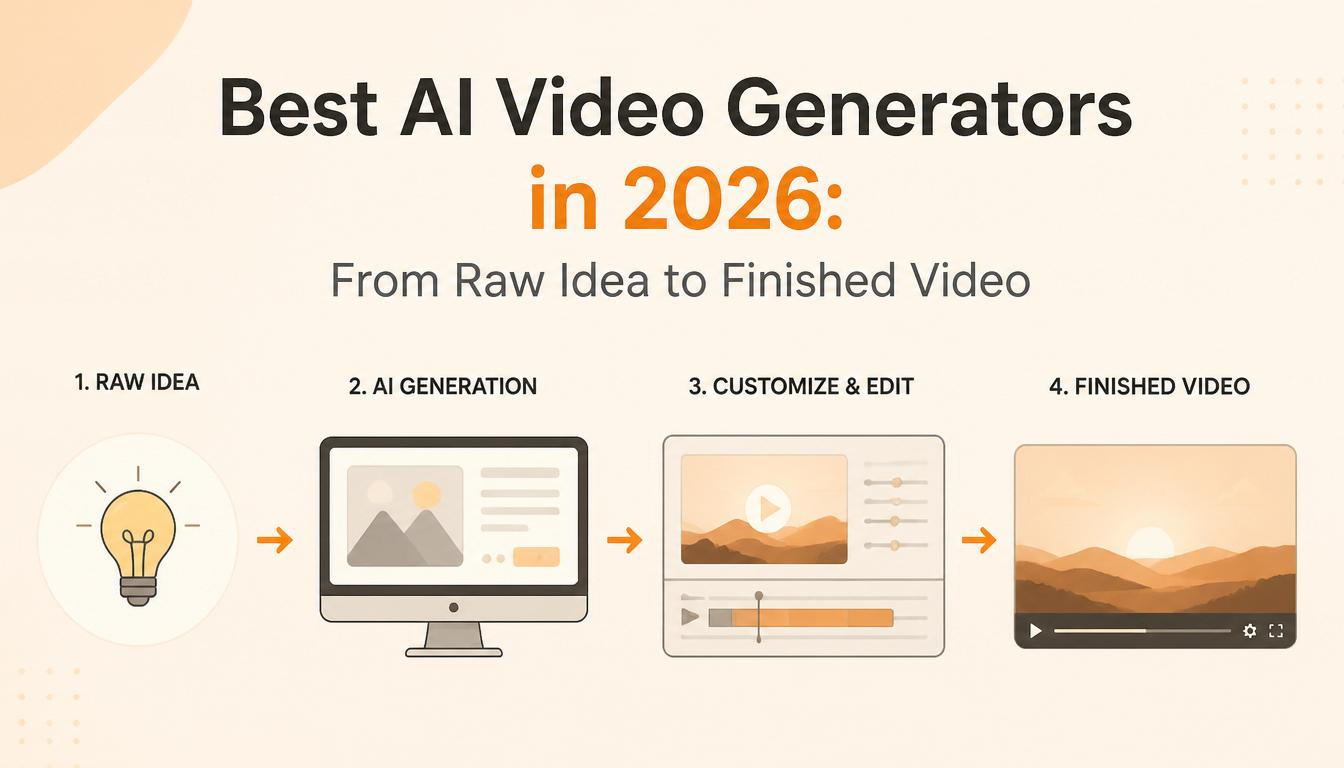
But here’s the thing most “best AI video generator” articles won’t tell you: picking the right generation model is only one piece of the puzzle. A raw AI clip isn’t a finished video. You still need a script, a voice, sound design, editing, and possibly upscaling. The real question isn’t “which generator is best?” — it’s “which combination of tools gets me from an idea in my head to a finished video I can actually publish?”
That’s what this guide covers.
The Generators: Where Your Footage Comes From
The generation landscape has settled into clear tiers, and each model has carved out a distinct identity. Rather than ranking them on some abstract quality score, here’s what each one is actually best at and what it will cost you.
Google Veo 3.1 — The Technical Leader
Veo 3.1 is the most complete video model on the market right now. It generates native 4K at up to 60 frames per second with synchronised audio — ambient sound, dialogue, sound effects — all produced in a single generation pass. No other model matches that combination of resolution and integrated audio quality.
Where Veo really pulls ahead is versatility. It supports text-to-video, image-to-video, and video-to-video extension, which means you can generate an initial clip and then extend it by additional seconds, building longer sequences iteratively. For teams that need to construct scenes rather than just generate one-shot clips, that extension capability changes the workflow entirely.
The trade-off is price. Fast mode runs around $0.15 per second of generated video. Standard mode — the tier you want for final deliverables — costs roughly $0.40 per second. A thirty-second clip in standard mode costs about twelve dollars. That adds up quickly if you’re iterating, which is why most production teams use Veo for their final render and draft on cheaper models first.
If your workflow already lives inside Google’s ecosystem — Drive, YouTube Studio, Google Ads — Veo integrates natively, which removes a surprising amount of friction from the publish step.
Kling 3.0 — The Workhorse
Built by Kuaishou, the Chinese short-video giant, Kling has quietly become the most practical choice for high-volume production. The model hit $100 million in annual recurring revenue within ten months of launch, largely because it nails the two things that matter most for working creators: consistency and cost.
Kling excels at photorealistic human characters. It includes a built-in face-locking system that lets you upload reference images and maintain that character’s appearance across unlimited generations — different angles, different lighting, different expressions. For anyone producing a series of videos that need to feature the same person, that consistency alone justifies choosing Kling over competitors where you’re rolling the dice on character stability every time you hit generate.
Pricing sits around $0.10 per second, making it the cheapest premium model available. A thirty-second video costs roughly three dollars. For social media teams producing dozens of clips per week, that price difference against Veo or Sora isn’t trivial — it’s the difference between a viable workflow and an unsustainable one.
The latest version — Kling 3.0 Omni — also handles native audio with lip-sync in five languages and a shared audio timeline across multi-shot sequences. The audio quality doesn’t quite match Veo’s, but it’s good enough for social content and most marketing use cases.
Runway Gen-4.5 — The Creative Director’s Choice
Runway occupies a different position in the market. Where Veo wins on technical specs and Kling wins on price, Runway wins on control. It offers the most granular creative toolkit of any generator: cinematic camera choreography, performance capture, reference image controls for brand consistency, and in-context video-to-video transformation.
For agencies and studios that need to match a specific visual brief — a brand’s colour palette, a particular camera style, a specific mood — Runway is the tool that gets closest to letting you direct the AI rather than just prompting it. The distinction matters. A prompt says “make me a video of X.” Runway’s controls let you say “make me a video of X, shot on a 35mm lens, with a slow dolly push, warm colour grade, and this exact character wearing this exact outfit.”
Pricing uses a credit system that works out to roughly $0.12 per second on paid plans, with a subscription starting around $15 per month. The learning curve is steeper than Kling or Veo — there are more knobs to turn — but for users who want that control, nothing else comes close.
Seedance 2.0 — The Dark Horse
Seedance has been climbing the rankings fast, and for good reason. Its standout feature is motion transfer: you upload a reference video showing how a character should move, and Seedance replicates that motion with remarkable accuracy. Complex choreography, sports movements, subtle gestures — it handles physical performance in a way that other generators still struggle with.
The model also excels at cinematic camera movement and dynamic physics. In blind creator tests, Seedance clips frequently get mistaken for footage from established models that cost twice as much. For image-to-video workflows specifically — where you start with a still and want to bring it to life — Seedance is arguably the strongest option available.
Pricing is competitive, and the audio capabilities are solid, particularly for lip-sync on talking-head content. The main limitation is ecosystem: Seedance doesn’t have the integration depth of Veo or the editing toolkit of Runway. It does one thing — generate excellent footage from images and motion references — and it does it very well.
A Note on Sora
OpenAI’s Sora deserves a mention, but with a caveat. The Sora web and app interfaces were shut down in April 2026, and the API is scheduled to follow in September. The model still produces impressive footage — strong physics, cinematic storytelling, solid character consistency — but building a production pipeline on a tool with a published end-of-life date is a risk most teams shouldn’t take. If you already have Sora workflows, plan a migration to Veo, Kling, or Runway. If you’re starting fresh, start elsewhere.
Beyond Generation: The Tools That Complete the Pipeline
Here’s where most comparison articles stop. They rank the generators, pick a winner, and call it a day. But anyone who’s actually produced video content knows that raw footage — AI-generated or otherwise — is maybe 40% of the finished product. The rest is script, voice, sound, editing, and finishing.
The good news: AI has eaten into every one of those steps too.
Scripting and Planning
LTX Studio is the closest thing to an end-to-end AI production platform. You can go from a text prompt to a complete storyboard with scene breakdowns, camera directions, character definitions, and shot lists — all before you generate a single frame of video. It supports character consistency across scenes, shared assets, and collaborative editing within the same workspace. Think of it as pre-production in a browser tab.
InVideo AI takes a different approach. Its agent-based workflow handles the entire pipeline from a single text input: it writes the script, selects or generates visuals, adds voiceover, and assembles the edit. You describe what you want in plain English — “a two-minute explainer about vertical AI SaaS for LinkedIn” — and the agent produces a complete video. The output isn’t going to win any film festivals, but for high-volume social content where speed matters more than cinematic polish, it’s remarkably effective.
For writers who prefer more control over the script itself, using Claude or ChatGPT to draft and refine a video script before feeding it into a generation tool remains the simplest and most flexible approach. Write the script, break it into scenes, describe each scene as a generation prompt, and assemble the results.
Voice and Audio
ElevenLabs dominates AI voice generation. The voice cloning is eerily accurate, the emotional range has improved dramatically, and it supports dozens of languages with natural-sounding delivery. For explainer videos, narrated content, or any format that needs a professional voiceover without booking a voice actor, ElevenLabs is the default choice.
Kling 3.0 Omni, Veo 3.1, and Seedance 2.0 all generate native audio alongside video now — dialogue, ambient sound, and background music in a single pass. The quality varies, and purists will still prefer to generate silent video and layer audio separately for maximum control. But for social content where speed trumps perfection, native audio generation saves an entire production step.
For sound effects and ambient audio, dedicated libraries like Epidemic Sound or Artlist still outperform AI-generated alternatives for anything that needs to feel polished and intentional.
Editing and Assembly
Descript has evolved from a transcription tool into a genuine AI-powered editing platform. The core concept — edit video by editing text — remains brilliant. You see your video as a transcript, cut words, and the video cuts with them. Add Studio Sound for AI noise removal, and you’ve got clean audio from almost any source. For talking-head and narrated content, it’s the fastest editing workflow available.
CapCut is the volume play. It’s free, it’s fast, it has auto-captions, templates, and enough AI-powered features (background removal, voice effects, auto-reframe for different aspect ratios) to handle most social media editing needs without opening a professional NLE. Most creators producing daily or weekly content for TikTok, Reels, or Shorts are using CapCut or something very similar.
Adobe Premiere Pro and DaVinci Resolve remain the professional standard for anything complex. Both have added AI features — Premiere’s AI-powered scene detection and auto-colour, Resolve’s Magic Mask for rotoscoping and neural engine for colour matching — but they’re editing suites that happen to include AI, not AI-first tools. If your final output needs professional-grade finishing, colour grading, or multi-track audio mixing, you’ll end up here regardless of where you generated the footage.
Upscaling and Finishing
Topaz Video AI is the quiet essential. It doesn’t generate anything — it makes your existing footage better. Upscaling, noise reduction, motion deblur, frame interpolation for smooth slow-motion. If you’re working with AI-generated clips that came out at 720p or 1080p and need to deliver at 4K, Topaz handles the upscale with minimal artefacts. At $299 as a one-time purchase (no subscription), it pays for itself quickly for anyone producing video regularly.
Multi-Model Hubs
One trend worth flagging: platforms like fal.ai, WaveSpeed, and Upsampler aggregate multiple generation models under a single interface and billing system. Instead of maintaining separate subscriptions to Veo, Kling, Runway, and Seedance, you access all of them through one dashboard with pay-per-use pricing.
This matters because the honest answer to “which generator should I use?” is increasingly “it depends on the shot.” A cinematic landscape might look best from Veo. A talking-head scene might work better from Kling. A stylised motion sequence might shine on Seedance. Multi-model hubs let you pick the right tool for each clip without the overhead of managing four different accounts.
Putting It Together: Two Sample Workflows
The Fast Workflow (Solo Creator, Social Content)
Write a brief script or bullet points. Feed it into InVideo AI or describe the scenes to an LLM. Generate clips using Kling (cheapest, fast, good enough for social). Add voice with ElevenLabs or use Kling’s native audio. Edit and add captions in CapCut. Publish. Total cost per video: roughly $5–$15 depending on length. Total time: under an hour.
The Quality Workflow (Agency, Client Deliverable)
Develop a full script and storyboard in LTX Studio. Generate hero shots in Veo 3.1 Standard for maximum quality. Use Kling for B-roll and secondary footage to manage costs. Record or generate voiceover through ElevenLabs. Edit in Premiere Pro or DaVinci Resolve. Upscale any sub-4K clips through Topaz. Colour grade and finish. Total cost per video: $50–$200 depending on length and iteration. Total time: half a day to a full day, versus the week-plus it would have taken with traditional production.
What to Watch for Next
Native audio is quickly becoming table stakes rather than a differentiator. By the end of 2026, expect every major generator to include synchronised sound as a default feature.
Clip duration is stretching. Most generators still top out at eight to fifteen seconds per clip, but iterative extension (generating a clip, then extending it) is making longer sequences viable without stitching together disconnected shots.
Character consistency across scenes — the ability to maintain the same person’s appearance, clothing, and mannerisms across an entire video — is the current frontier. Kling and Runway lead here, but every major model is racing to solve it because it’s the unlock that turns AI video from “cool clips” into “actual storytelling.”
And open-source models, particularly Wan 2.6 and its successors, are closing the quality gap with commercial tools. If you have a GPU with 24GB or more of VRAM, you can run competitive video generation locally at zero marginal cost. That’s not practical for most people today, but the trajectory is clear.
The Bottom Line
There is no single best AI video generator in 2026. There is a best generator for your specific use case, budget, and workflow. If forced to pick defaults: Veo 3.1 for maximum quality, Kling 3.0 for best value, Runway Gen-4.5 for creative control, and Seedance 2.0 for motion and image-to-video work.
But the bigger insight is that the generator is just one link in a chain. The teams producing the best AI video right now aren’t the ones with the fanciest model — they’re the ones who’ve built a complete pipeline from idea to published video, using the right tool at each step, and iterating fast enough that the cost of experimentation is basically zero.
That pipeline — script to generation to voice to edit to finish — is the actual product. The individual tools are just components. Pick the components that fit your workflow, your budget, and your quality bar, and start building.
Something strange happened in enterprise software over the past twelve months. The conversation about AI agents stopped being theoretical. Nobody at industry conferences is asking “what is an AI agent?” anymore. The questions have gotten sharper, more specific, and far more interesting: How do you price an agent that replaces a $95,000-a-year workflow? What happens when one agent spawns another agent and nobody can trace the decision chain? Who’s liable when an autonomous system approves a transaction it shouldn’t have?
That shift — from curiosity to operational reality — is the story of AI agents in 2026. And if you’re building software, running a business, or just trying to understand where technology is actually heading (as opposed to where LinkedIn influencers say it’s heading), this is the category worth paying attention to.
What Changed, and Why It Matters Now
A year ago, most AI agents were glorified chatbots with a few API connections bolted on. They could answer questions, maybe draft an email, occasionally pull data from a spreadsheet. Useful, sure. But nobody was restructuring their operations around them.
That era is over. The agents being deployed today don’t just respond to prompts — they observe, plan, execute multi-step workflows, use external tools, and loop back to correct their own mistakes. Think of the difference between asking someone a question and hiring someone to manage a process. That’s the gap that just closed.
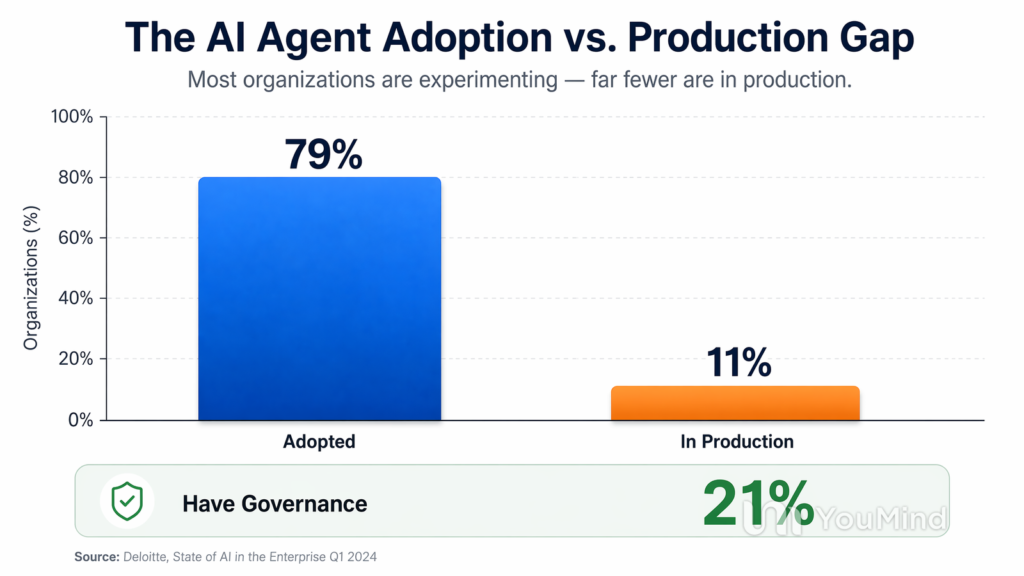
The numbers tell part of the story. Over 80% of technical teams have moved past the planning stage into active testing or production deployment. Nearly six in ten organisations now have agents running in live environments. And the market itself is on a trajectory that analysts project will grow from under $10 billion today to over $250 billion within the next decade.
But raw market projections don’t capture what’s actually happening on the ground. What’s happening on the ground is that companies are discovering agents can do things that traditional automation never could — because agents don’t need a rigid script. They adapt.
Where Agents Are Actually Working (Not Just Demoing)
The gap between demo and deployment has always been the graveyard of enterprise technology. Plenty of tools look brilliant in a sales presentation and collapse the moment they encounter messy, real-world data. So where are AI agents actually delivering?
Operations and workflow orchestration is the biggest deployment category. An agent that reviews incoming requests, classifies urgency, identifies the right approver, checks for missing information, sends follow-ups, and escalates when deadlines slip — that’s not a hypothetical. That’s running in production at dozens of companies right now. The agent handles the process; humans handle the judgement calls.
Customer service has moved well beyond scripted chatbots. Sierra, which builds AI agents for enterprise customer support, is serving more than 40% of the Fortune 50. Their agents don’t just answer FAQs — they access account data, process changes, and resolve issues end-to-end. The economics are compelling: companies paying $8 to $15 per human-handled support interaction are seeing agent-handled interactions cost a fraction of that, with comparable satisfaction scores.
Software development is arguably the most visible category. Coding agents like Claude Code and Cursor don’t just autocomplete lines of code — they read entire repositories, understand project architecture, implement features across multiple files, run tests, and iterate on failures. Claude Code alone is now responsible for roughly 4% of all public commits on GitHub. That’s not a tool. That’s a team member.
Healthcare administration is a quieter but potentially larger story. Mayo Clinic has piloted AI agents to automate scheduling, documentation, and back-office administrative work. Oxford University Hospitals built agents that summarise patient charts, determine cancer staging, and draft treatment plans for tumour boards. The clinical staff focus on patients; the agents handle the paperwork that was eating their days alive.
Drug discovery is being reshaped at the research layer. Genentech built agent ecosystems on cloud infrastructure to automate complex research workflows, freeing scientists to concentrate on the creative and interpretive work that actually leads to breakthroughs.
The Pricing Question Nobody Has Solved
Here’s where things get genuinely interesting — and genuinely messy. Traditional SaaS charges per seat, per month. But an AI agent doesn’t occupy a seat. It might replace half a workflow that three people share, or it might handle a volume of work that fluctuates wildly from week to week. Per-seat pricing doesn’t map onto what agents actually do.
The industry is experimenting with three models, and none of them have clearly won.
The first is subscription with usage caps — a flat monthly fee that includes a certain volume of agent actions, with overages billed on top. This is familiar to buyers and easy to budget for, but it creates awkward incentives. If the agent gets better and handles more volume, the customer pays more for the same outcome.
The second is outcome-based pricing — charging per resolved ticket, per processed application, per completed workflow. This aligns the vendor’s incentive with the customer’s value, which sounds elegant in theory. In practice, it requires airtight definitions of what counts as a “resolution” and creates unpredictable revenue for the vendor.
The third, and the one gaining the most traction in 2026, is a hybrid model — a base subscription that provides a revenue floor, plus per-outcome fees above a certain threshold. This gives vendors predictable income and gives buyers a sense that they’re paying for results rather than idle software.
The companies that figure out pricing first will have a meaningful advantage, because the current confusion is slowing enterprise adoption. Procurement teams know how to approve a $50,000 annual software license. They don’t know how to approve an open-ended commitment that might cost $20,000 one month and $120,000 the next.
The Security Problem That Keeps CISOs Awake
If pricing is the unsolved business problem, security is the unsolved technical one — and it’s arguably more urgent.
Traditional software security is built around a simple model: humans authenticate, software executes within defined permissions, and audit logs track who did what. AI agents break every part of that model. An agent isn’t a human, but it needs access to systems that were designed for human users. It makes decisions, but those decisions emerge from probabilistic models rather than deterministic code. It can be manipulated through prompt injection — instructions hidden in data that trick the agent into doing something its operators never intended.
The data from 2026 is sobering. Only about 14% of organisations report that all their AI agents went into production with full security and IT approval. That means the vast majority of deployed agents are operating with incomplete oversight. A quarter of deployed agents can create and task other agents, which means the chain of accountability becomes nearly impossible to trace once you’re more than one layer deep.
The U.S. federal government has taken notice. The National Institute of Standards and Technology issued a formal request for information on AI agent security earlier this year, specifically flagging the risks of agents that operate with little to no human oversight and interact with critical infrastructure.
What does responsible agent security actually look like? The emerging consensus centres on three principles. First, treat every agent as an identity — the same way you’d onboard an employee, with specific permissions, access controls, and audit trails. Second, enforce minimum necessary scope: the agent should only access the systems and data it needs for its assigned workflow, nothing more. Third, build kill switches and human approval gates into any workflow where the stakes are high enough that a mistake would cause real damage.
Companies that treat agent security as an afterthought are building on sand. The ones that build governance into the architecture from day one are the ones that enterprise buyers will trust enough to hand over their critical workflows.
Multi-Agent Systems: When One Agent Isn’t Enough
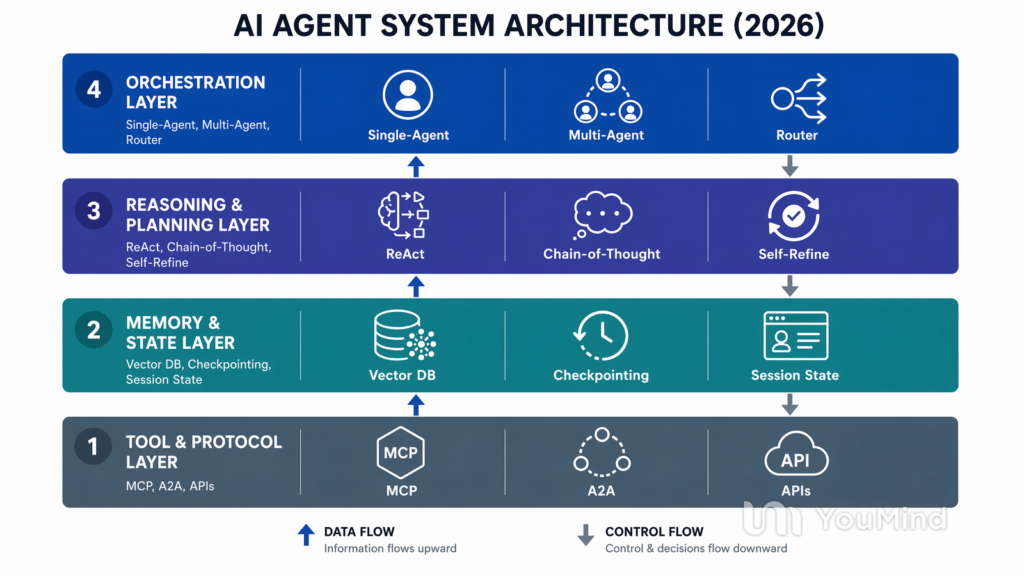
The next frontier — already in early production at some organisations — is multi-agent architectures, where specialised agents collaborate to complete workflows that would be too complex for any single agent.
Picture a lead qualification pipeline. A research agent gathers company and contact data from public sources. A scoring agent evaluates the lead against ideal customer profile criteria. A writing agent drafts personalised outreach. An orchestration agent coordinates the sequence, handles exceptions, and routes the final output to the right salesperson. Each agent is focused and specialised. Together, they run a process that used to require a team of SDRs and hours of manual work.
This is not science fiction. Tools like n8n, LangChain, AutoGen, and CrewAI are enabling these multi-agent workflows today, and the patterns are becoming repeatable. The sophistication is growing quickly — but so is the complexity of managing, debugging, and securing these systems when something goes sideways.
The practical advice from teams already running multi-agent systems is consistent: start with a single-agent workflow that handles one task extremely well. Prove reliability. Then add a second agent when specialisation clearly improves the outcome. Don’t design a multi-agent orchestra before you’ve built a single instrument that plays in tune.
What This Means If You’re Building (or Buying)
For founders and builders, the opportunity is in vertical agents — systems designed for a specific industry with deep domain knowledge, proprietary data, and tight integration into existing workflows. Generic agent platforms will struggle against the foundation model providers (OpenAI, Anthropic, Google) who can ship similar capabilities for free. But an agent that understands the specific compliance requirements of community banking, or the documentation standards of behavioural health, or the inspection workflows of commercial real estate — that’s defensible. The big players won’t bother building it, and the generic tools can’t match the depth.
For enterprise buyers, the most important thing you can do right now is pick one high-volume, structured workflow and deploy an agent against it. Not a flashy demo. Not a company-wide transformation initiative. One workflow. Measure the outcome. Learn what breaks. Then expand. The organisations getting the most value from agents in 2026 are the ones that started small, proved ROI on a single process, and scaled from evidence rather than ambition.
For everyone else — and honestly, this includes most of us — the practical takeaway is that AI agents are about to become as routine as email. Not because the technology is mature (it isn’t), and not because every deployment succeeds (they don’t). But because the gap between what agents can do and what businesses need done is narrowing fast enough that ignoring the category is no longer a viable strategy.
The era of simple prompts is ending. The era of AI that actually does things — plans, executes, adjusts, and delivers outcomes — is just getting started. The companies and individuals who figure out how to work with these systems, rather than just talk about them, will have an edge that compounds every quarter.
And that edge is already showing up in the numbers.
General-purpose AI is a bloodbath. OpenAI, Google, Anthropic, and Meta are spending tens of billions on foundation models that commoditise every horizontal use case you can think of. Writing assistants, generic chatbots, all-purpose summarisers — these categories are already collapsing under the weight of free alternatives built on top of the same underlying models. Chegg went from a $14 billion market cap to under $200 million. Stack Overflow lost half its traffic. Jasper slashed its own internal valuation by 20%.
The lesson is clear: if a general-purpose LLM can replicate your core function for free, your business is dead on arrival.
But there’s a parallel story that gets far less attention. While horizontal AI tools implode, vertical AI SaaS companies — products built to solve specific problems in specific industries — are growing faster than almost any software category in history. Harvey, the legal AI platform, hit $190 million in ARR. Sierra, which builds AI agents for customer service, reached $150 million ARR in just eight quarters. The vertical SaaS market alone has crossed $157 billion and is growing two to three times faster than horizontal SaaS.
The opportunity isn’t in building another ChatGPT wrapper. It’s in finding the overlooked corners of the economy where professionals are still drowning in manual work, where the workflows are too specialised for generic tools to handle, and where regulatory complexity creates a natural moat that keeps the big players from casually entering.
Here are five verticals where the gap between the pain and the available solutions is widest.
Legal Document Generation
Law firms generate millions of documents every year — contracts, briefs, motions, compliance filings, disclosure letters — and the overwhelming majority of this output follows predictable patterns within each practice area. Yet most firms still rely on associates manually adapting precedent documents, a process that’s slow, expensive, and error-prone.
The opportunity isn’t in building a general document drafter. It’s in owning the full pipeline for a specific document type within a specific jurisdiction. Think: commercial lease agreements that automatically extract and benchmark the 40-plus data points property lawyers actually care about, flagging non-standard clauses against market norms and integrating directly with practice management systems like Clio or PracticePanther.
Harvey has proven that law firms will pay premium prices for AI that understands legal language deeply enough to trust. But Harvey is going wide across the profession. The gap is in the narrow verticals within legal: immigration filing preparation, family law financial disclosure automation, construction lien compliance, or regulatory submission packages for specific agencies. Each of these is a multi-million dollar niche with workflows too specialised for Harvey or any general tool to own completely.
Real Estate Virtual Assistants
Real estate is one of the last major industries where the primary mode of business communication is still phone calls and text messages between agents, buyers, lenders, inspectors, and title companies. The transaction coordination alone — managing timelines, chasing signatures, scheduling inspections, confirming contingency deadlines — buries agents in administrative work that earns them nothing.
A vertical AI assistant for real estate isn’t a chatbot on a website. It’s an agent that sits inside the transaction workflow: monitoring MLS data, auto-generating comparative market analyses, managing showing schedules, following up with leads based on their behaviour patterns, and coordinating the eighteen-step closing process without the agent needing to manually track every deadline.
The defensibility here comes from integration depth. An AI assistant that connects to the MLS, the CRM, the e-signature platform, the lender portal, and the title company’s system simultaneously becomes infrastructure that’s painful to rip out. Real estate technology is famously fragmented — dozens of regional MLS systems, hundreds of brokerages with different tech stacks — which is exactly why big tech hasn’t bothered. That fragmentation is your moat.
The underserved sub-niches are even more compelling: commercial real estate investment analysis, property management maintenance triage (routing tenant requests to the right vendor at the right priority), and short-term rental dynamic pricing and guest communication. Each could sustain a standalone SaaS business.
Healthcare Documentation
Physicians spend more time on documentation than on patient care. That’s not an exaggeration — studies consistently show that for every hour of direct clinical work, doctors spend roughly two hours on electronic health records and administrative tasks. The result is epidemic burnout, reduced care quality, and a healthcare system that’s haemorrhaging its most expensive resource: clinician time.
AI-powered clinical documentation tools are already a growing category. Products like Abridge, Suki, and Nuance’s Dragon Medical use voice recognition and natural language processing to transcribe patient encounters into structured notes. But the market remains deeply fragmented by specialty, and most existing tools are built for primary care workflows.
The overlooked opportunities live in the specialties. Behavioural health documentation has unique requirements around treatment plans, progress notes, and insurance pre-authorisation that generic tools handle poorly. Veterinary medicine — a $2.1 billion software market growing at 9% annually — uses entirely different drug databases, anatomical references, and billing codes, yet gets almost zero attention from healthcare AI startups because the human medicine market looks bigger on paper. Dental practices, physical therapy clinics, and allied health providers each have documentation workflows distinct enough to justify a dedicated product.
The regulatory dimension creates a natural moat here. HIPAA compliance, specialty-specific coding accuracy, and integration with EHR systems like Epic, Cerner, or Athenahealth require deep domain knowledge that generic AI tools simply don’t have. Getting it wrong doesn’t just annoy users — it creates legal liability.
ESG Compliance Analysis
Environmental, Social, and Governance reporting has gone from a nice-to-have corporate initiative to a regulatory mandate in most major economies. The EU’s Corporate Sustainability Reporting Directive now covers roughly 50,000 companies. The SEC has introduced climate disclosure rules. Australia, Singapore, and the UK have each rolled out their own frameworks. The result is a compliance landscape so fragmented and fast-moving that most companies are scrambling to keep up using spreadsheets and consultants.
This is exactly the kind of problem vertical AI was made for. ESG compliance requires monitoring regulatory changes across multiple jurisdictions, collecting data from dozens of internal systems, mapping that data to the correct reporting framework, identifying gaps, and generating disclosures that meet precise formatting and content requirements. It’s high-volume, high-complexity, and high-stakes — but the underlying patterns are learnable.
The specific gap is in mid-market companies. Large enterprises hire teams of ESG consultants and buy platforms like Persefoni or Watershed. Small companies often fall below the reporting threshold. But mid-market firms — 500 to 5,000 employees — face the same regulatory obligations with a fraction of the resources. An AI-native platform that automates data collection from existing systems, maps it to applicable frameworks, flags compliance gaps, and drafts reporting language could charge $2,000 to $10,000 per month and find a massive, underserved market.
Supply chain ESG compliance is an even more overlooked sub-niche. Companies are increasingly liable for the environmental and labour practices of their suppliers, but most have no automated way to assess, monitor, or document supplier compliance.
Fraud Detection for Mid-Market Financial Services
Fraud detection in banking is dominated by legacy players like NICE Actimize, SAS, and FICO — enterprise-grade platforms designed for the largest financial institutions, priced accordingly, and requiring months of implementation. Community banks, credit unions, regional insurers, and mid-size payment processors face the same fraud threats but lack the budget or the technical staff to deploy these systems.
The vertical AI opportunity is building fraud detection that’s designed from the ground up for these smaller institutions. Not a watered-down enterprise product, but a purpose-built platform that accounts for their specific transaction patterns, regulatory reporting requirements, and operational constraints. A credit union processing $500 million in annual transactions has fundamentally different fraud patterns than JPMorgan, and a tool trained on community banking data will outperform a generic model on that institution’s specific risk profile.
Adjacent niches are equally promising: insurance claims fraud for regional carriers, accounts payable fraud detection for mid-market companies (where invoice manipulation and vendor impersonation are rampant), and healthcare claims compliance analysis, where AI tools review billing patterns to flag irregularities before they trigger audits.
The Playbook for Picking a Vertical
The five ideas above share a common anatomy. Each targets an industry where manual work is still the norm, where regulatory complexity creates switching costs, where generic AI tools fall short because they lack domain-specific data and workflow integration, and where the big players have chosen to ignore the niche because the adjacent market looks bigger.
If you’re evaluating your own vertical AI idea, the framework is straightforward. First, identify a single, specific workflow — not a category — where professionals spend hours on repetitive tasks that follow recognisable patterns. Second, verify that the pain is severe enough that companies will pay meaningful subscription fees, not just nice-to-have money. Third, confirm that the problem requires domain-specific data, integrations, or regulatory knowledge that a general-purpose model can’t replicate by default. And finally, check that the incumbent solutions are either outdated, overpriced for the segment you’re targeting, or simply nonexistent.
The window is open. Vertical AI SaaS is where solo founders and small teams can build $500K to $5M ARR businesses within 12 to 18 months — and unlike horizontal AI, these businesses have real moats, real margins, and real staying power.
In Q1 of 2026, AI startups raised $255.5 billion globally. That’s not a typo. A quarter trillion dollars. In three months. And here’s the thing — that single quarter blew past the entire 2025 full-year total for AI venture funding.
I’ve been tracking startup funding for years and I’ve never seen anything like it. Not during the dot-com era. Not during the mobile app gold rush. Not during the crypto boom. The scale of capital moving into AI right now is genuinely unprecedented, and if you’re not paying close attention to where it’s going — and more importantly, where it isn’t — you’re missing the actual story.
So let’s talk about it. Not the press release version. The uncomfortable one.
Three Companies, Two-Thirds of Everything
PitchBook dropped a report a few days ago that should honestly be required reading for anyone in this industry. Of that $255.5 billion in Q1, three companies — OpenAI, Anthropic, and xAI — accounted for $172 billion. That’s 67.3% of all AI venture capital.
Let that sit for a second.
The remaining $83.5 billion got split across 1,543 other companies. Quick math: that’s about $54 million per company on average. But averages lie, and they lie hard here. The median AI VC deal size in 2025 was $5 million. The mean was $35.8 million. The gap between those two numbers tells you everything about how concentrated this market has become. A tiny handful of deals at the top are yanking the averages up while most AI startups are raising perfectly normal, unremarkable rounds.
And it’s getting worse, not better. Foundational AI companies — the ones building the actual models — raised $178 billion in Q1 2026 across just 24 deals. Twenty-four. In all of 2025, that category did $88.9 billion across 66 deals. The number of companies getting funded at this level is shrinking while the check sizes are exploding.
There’s a word for this dynamic and it’s not “healthy ecosystem.”
Here it is, in case you want to stare at the numbers directly:
Segment
Companies
Funding (Q1 2026)
Share
The Big Three — OpenAI, Anthropic, xAI
3
$172 billion
67.3%
Everyone else
1,543
$83.5 billion
32.7%
Total
1,546
$255.5 billion
100%
Three companies. Two-thirds of the money. The “everyone else” bucket works out to roughly $54 million per company on average — but remember, the median deal was $5 million. Most of those 1,543 companies raised far less than the average suggests.
Follow the Money (It’s Not VC Anymore)
One of the weirder subplots that doesn’t get enough attention: venture capital isn’t really driving this anymore.
Corporate venture capital now represents 43% of AI startup funding. Sovereign wealth funds are piling in. Microsoft, Amazon, Google, NVIDIA — they’re not writing checks because they want 10x returns on a Series B. They’re writing checks because they need to lock down compute agreements, secure cloud revenue, and make sure they don’t get left behind in a platform shift that could eat their existing businesses.
When Microsoft disclosed that 45% of its $625 billion cloud backlog was tied to OpenAI, the stock dropped 12% in a single day. That’s $440 billion in market cap. Evaporated. Because investors suddenly realized that a huge chunk of Microsoft’s future revenue depends on a company that burns $17 billion a year and doesn’t expect to turn a profit until 2030.
That’s not a venture capital relationship. That’s a dependency. And it’s not limited to Microsoft.
The “investment” flowing into these companies is increasingly circular. Microsoft invests in OpenAI, which spends the money on Azure compute, which shows up as Microsoft cloud revenue, which justifies the investment. Amazon invests in Anthropic, Anthropic buys AWS compute, Amazon reports cloud growth. Around and around it goes. Everyone’s revenue is someone else’s cost. It works brilliantly until someone decides the music stopped.
The Unit Economics Are Brutal
Let’s look at OpenAI, since they’re the biggest and most transparently messy.
They’re targeting about $30 billion in revenue for 2026. That sounds impressive — and it is, in absolute terms. But they’re burning roughly $17 billion to get there. Their own internal projections show losses tripling to $14 billion this year against roughly $13 billion in sales, with total spending around $22 billion. They lost $13.5 billion in just the first half of 2025.
Every dollar of revenue costs them more than a dollar to generate. The cumulative burn from 2025 through 2029? An estimated $115 billion.
Let me put OpenAI’s numbers in one place, because seeing them side by side makes the absurdity harder to ignore:
Metric
2025
2026 (Projected)
Revenue
Not disclosed
~$30B
Net Loss
$13.5B (H1 only)
~$14B
Cash Burn
—
~$17B
Total Spending
—
~$22B
Valuation
$300B (Mar round)
~$850B (Mar round)
Forward Revenue Multiple
—
~28x
They’re valued at roughly $850 billion as of their March 2026 round. At $30 billion in projected revenue, that’s somewhere around 28x forward revenue. For a company with negative gross margins. In what universe is that sustainable?
Anthropic is doing better on the surface — they surprised everyone by hitting a $30 billion annualized run-rate earlier this year. But they’re also burning cash at a pace that makes traditional SaaS investors queasy, and their valuation sits around $380 billion. The model providers are in an arms race where the cost of competing goes up faster than the revenue does. Every new model generation requires more compute, more data, more infrastructure, and the pricing pressure from open-source alternatives and Chinese competitors means you can’t just pass those costs to customers.
A quick side-by-side puts the two Western leaders in perspective:
Metric
OpenAI
Anthropic
Valuation
~$850B
~$380B
2026 Revenue (projected)
~$30B
$30B annualized run-rate
2026 Cash Burn
~$17B
Not disclosed
Path to Profitability
2029 target
Not disclosed
Key Strategic Backer
Microsoft
Amazon
Revenue Multiple
~28x forward
~12.7x (on run-rate)
Anthropic’s multiple looks almost reasonable by comparison. Almost. Neither company has demonstrated that selling intelligence at scale produces software-like margins rather than infrastructure-like ones.
And then there’s DeepSeek. In February 2026, they launched V4 — a trillion-parameter coding model with a million-token context window. Built at a fraction of the cost of Western frontier models. If Chinese labs can produce competitive AI without burning through $17 billion a year, the entire “scale is the moat” thesis falls apart. You don’t need a fancy financial model to see the problem there.
What About Everyone Else?
The non-foundational-model startups — the application layer, the vertical SaaS plays, the tooling companies — are living in a completely different reality from the handful of giants at the top.
They’re raising at perfectly normal multiples. The AI startup valuation range in 2026 is wide — 10x to 50x revenue, with the median landing somewhere around 20x to 30x. But those multiples come with strings attached. Investors are asking harder questions than they were two years ago. What’s your moat, really? What happens when the model providers ship a feature that does 80% of what your product does? How defensible is your data advantage?
The application-layer AI companies that are actually doing well tend to have one thing in common: they’re not just thin wrappers around someone else’s API. They own a workflow. They have proprietary data. They solve a problem that’s too specific, too regulated, or too operationally complex for a horizontal model provider to bother with. Everything else is walking dead — it just doesn’t know it yet.
And early-stage funding? It’s getting squeezed. Only 14% of AI mega-deals in 2025 were early-stage. The money is flowing to the companies that already raised billions, not to the ones trying to raise their first million. That’s a problem for the ecosystem long-term, even if nobody wants to talk about it while the party’s still going.
Is This a Bubble?
I get asked this constantly. And the honest answer is: it depends on what you mean by “bubble.”
If you mean “are AI company valuations completely unhinged from economic reality?” — yes, absolutely. The S&P 500 is trading at 23x forward earnings, the most stretched it’s been since the dot-com era. The Bank of England formally warned about overvaluation risks in the AI sector. A National Bureau of Economic Research study found that 90% of firms report no measurable productivity impact from AI yet — but executives project it will increase productivity by 1.4%. That gap between expectation and reality is exactly the kind of thing that precedes a correction.
US mega-caps are expected to spend $1.1 trillion on AI between 2026 and 2029. Total AI spending is expected to surpass $1.6 trillion. Those are staggering numbers, and they assume a level of return that nobody has demonstrated yet.
But here’s the counterargument, and it’s not nothing: the dot-com comparison misses something important. In 2000, most of the money went into companies with no revenue, no infrastructure, and no real technology moat. Pets.com sold dog food online. Today’s AI giants are building actual infrastructure — data centers, custom silicon, model architectures that take years to develop. You can correct the valuation of a software company overnight. You can’t wish a $15 billion data center out of existence. The physical assets create a floor that the dot-com era never had.
What we’re probably heading for isn’t a pop. It’s a slow, grinding correction. The absurd valuations will come down. The “we put a chatbot on it” companies will disappear. The conversation will get more boring and more useful. That’s actually healthy.
The risk isn’t that AI fails. The risk is that the returns don’t justify the $1.6 trillion price tag. And that’s a much more interesting problem to think about.
What This Means If You’re Building
I’ll keep this practical because that’s what actually matters.
If you’re raising at the application layer, you need to be able to answer one question cold: what happens when OpenAI or Anthropic ships your feature? If your answer is “they won’t” or “our data moat is too deep,” you’d better have receipts. The model providers are not sitting still. They’re vacuuming up talent, acquiring companies, and expanding into enterprise workflows. Complacency is a death sentence.
If you’re an early-stage founder, the funding environment is probably tighter than the headline numbers suggest. Yes, $255 billion moved in Q1. Almost none of it went to pre-seed or seed-stage AI companies. You’re competing for attention in a market where the mega-rounds suck up all the oxygen. That means you need to be capital-efficient by default, not by aspiration. The burn multiple — how much you spend for every dollar of new recurring revenue — has become the investor metric of choice in 2026. AI-native startups that use automation to keep burn multiples below 1.0x are getting funded. Everyone else is fighting uphill.
And here’s something nobody in Silicon Valley wants to admit out loud: 29% of startups fail because they run out of money. Not because the product was bad. Not because the market wasn’t there. They just ran out of cash. In an environment where capital is concentrating at the top, that number goes up. If you’re building, know your runway down to the week. Twelve to eighteen months is comfortable. Anything under six is emergency mode.
The brutal truth about AI funding in 2026: there’s more money in the system than ever before, and it’s never been harder to get your hands on it unless you’re already one of the chosen few. The concentration at the top masks how competitive things are for everyone else. And the unit economics at the top suggest that even the chosen few haven’t figured out how to make the math work.
That’s not a reason to be bearish on AI. The technology is real, the adoption is real, and the long-term trajectory is up and to the right. But the funding environment has gotten weird in ways that reward skepticism. The people who win in markets like this are the ones who can tell the difference between a genuine growth story and a money-go-round — and who have the discipline to build something that works even when the easy money dries up.
Something strange happened between late 2025 and early 2026. The conversation around AI agents stopped being about “what if” and became about “how.” In boardrooms, developer channels, and startup pitch decks, the question shifted almost overnight: not whether agents will transform software, but which architecture, which framework, and what guardrails will get them into production without blowing up.
The numbers tell part of the story. The global AI agents market hit roughly $10.9 billion in 2026, up from $7.6 billion the year before — a 43% single-year jump that makes the early cloud migration look leisurely by comparison. Grand View Research projects the market reaching $50.3 billion by 2030 at a 45.8% CAGR, and some analysts extend that line all the way to $236 billion by 2034. AI startups raised $202 billion in 2025 alone, a 75% increase year-over-year, with 55 startups closing rounds of $100 million or more. Gartner expects that by the end of 2026, 40% of enterprise applications will embed task-specific AI agents.
But numbers only get you so far. Beneath the market enthusiasm sits a more interesting — and more honest — reality: enterprises are adopting AI agents at an astonishing 79% rate, yet only 11% have them running in production. That gap is not a footnote. It is the defining tension of the agentic moment.
The Gap Is the Story
Almost four in five enterprises have experimented with or deployed AI agents in some form. But only one in nine is running them in production. Only 21% of companies have a mature governance model for agents, according to Deloitte’s State of AI 2026 report. And here is the stat that should keep founders up at night: 88% of organizations deploying agents report security incidents, and one in eight security breaches now involve agentic systems. Only 23% of enterprises have agent-specific security frameworks in place.
What does this tell us? The technology has raced ahead of the operating model. Building an agent that works in a demo is straightforward — every major framework can get you there in an afternoon. Building one that runs reliably in production, handles edge cases gracefully, and doesn’t create new attack surfaces is an entirely different discipline. Most teams are still in the demo phase because the gap between “it works” and “it’s safe to deploy” is larger than anyone anticipated.
This is, oddly, good news for startups and builders who are paying attention. The gap is where value gets created. If everyone were already in production, the opportunity would be commoditized. The fact that 68% of enterprises are still figuring out the bridge from pilot to production means there is enormous room for tools, platforms, and practices that close it.
What an AI Agent Actually Is in 2026
If you have been following the space, you have probably noticed that the word “agent” has been stretched to the breaking point. Every chatbot wrapper, every RAG pipeline, every prompt template now calls itself an agent. That ambiguity is not just sloppy marketing — it creates real confusion about what to build and how to evaluate it.
In 2026, a meaningful definition has crystallized: an AI agent is a system that does not just respond to prompts but can reason, plan, and execute multi-step goals autonomously within a defined environment. The key words are plan, execute, and autonomously. A single-turn chatbot is not an agent. A system that calls an API once and formats the response is not an agent. An agent decides what to do next, which tool to use, and whether its own output is good enough — and then loops until the task is done.
Under the hood, modern agent systems are composed of four distinct architectural layers.
The Tool and Protocol Layer sits at the base. This is where agents connect to the outside world — APIs, databases, file systems, and increasingly, standardized protocols like the Model Context Protocol (MCP) and Agent-to-Agent Protocol (A2A). MCP, in particular, has become the closest thing the industry has to a universal connector, removing the need for bespoke integrations for every tool an agent might call. The shift is significant: in 2024, connecting an agent to a new data source meant writing custom glue code. In 2026, you register a tool once through a standard protocol and every compliant agent can discover and use it.
The Memory and State Layer handles what the agent remembers across turns, sessions, and tasks. This is where things get hard. Vector databases store semantic recall, checkpointing systems (LangGraph’s built-in time-travel debugging is the gold standard here) persist agent state, and session management ensures continuity. The unsolved problem: long-horizon memory. Agents still lose context over dozens of steps, and the compounding error problem — where small mistakes in step three cascade into catastrophic failures by step thirty — remains one of the biggest barriers to production deployment.
The Reasoning and Planning Layer is where the model decides what to do. The dominant patterns in 2026 are ReAct (Reason + Act, interleaving thought and tool calls), Chain-of-Thought with self-consistency, and increasingly sophisticated self-refinement loops where the agent evaluates its own output and iterates. Reinforcement Learning with Verifiable Rewards (RLVR), popularized by DeepSeek-R1 and now adopted across the industry, has made reasoning models dramatically better at staying on track over multi-step tasks. But even the best models still drift, hallucinate, and get trapped in unproductive loops.
The Orchestration Layer is the top of the stack — and the most architecturally consequential decision a team will make. This is where you choose between a single-agent system (one model driving the entire workflow), a multi-agent system (specialized agents collaborating on subtasks), or a router pattern (a lightweight model deciding which specialized agent to invoke). Most production systems in 2026 start single-agent and only expand to multi-agent when the task complexity genuinely demands it. The wisdom from teams that have been in production for a year or more is remarkably consistent: start with the simplest architecture that works, and resist the temptation to add agents just because the framework makes it easy.
The Framework Landscape: Pick Your Fighter
If architecture is strategy, the framework is your tactical platform. Three frameworks dominate the conversation in 2026, and they are not interchangeable.
LangGraph has become the default for production deployments. It models agent workflows as directed graphs with conditional edges, which means you get explicit control over every transition, built-in checkpointing for state persistence, and first-class human-in-the-loop interrupt points. Production teams consistently rate it 9/10 on reliability — the highest in the market. The trade-off is a steeper learning curve. You need to understand graph concepts, design state schemas carefully up front, and accept that refactoring those schemas as requirements evolve is a real cost. Teams building for production environments where failures are expensive — financial services, healthcare, compliance-heavy workflows — overwhelmingly choose LangGraph.
CrewAI wins on developer experience. It abstracts multi-agent coordination behind a role-based DSL: define a researcher agent, a writer agent, a reviewer agent, assign them to a crew with a process type, and you have a working prototype in under twenty lines of Python. The trade-off is control. CrewAI’s abstraction layer is deliberately high, which means fine-grained state management, complex error handling, and conditional routing are harder to achieve. Teams that start with CrewAI for prototyping often migrate to LangGraph when they need production-grade observability. CrewAI’s reliability score in production deployments hovers around 7/10 — improving fast, but still showing tool-call failure modes under load.
Microsoft AutoGen occupies a distinct niche: conversational multi-agent systems. If your use case involves agents that need to debate, reach consensus, or engage in structured multi-turn dialogue to solve a problem, AutoGen’s conversation primitive is the most natural fit. Its GroupChat manager routes messages between specialized agents, and the framework handles turn-taking, speaker selection, and conversation termination. The trade-off is structure: AutoGen outputs are inherently less predictable than graph-based approaches because conversations are open-ended. Production teams using AutoGen typically add custom guardrails — timeouts, turn limits, referee agents — to prevent unproductive loops.
A fourth contender worth watching: OpenAgents, which is currently the only framework with native support for both MCP and A2A protocols. Protocol-native architecture may become a decisive advantage as the ecosystem standardizes, but the framework’s community is still smaller than the big three.
The decision framework that experienced teams use is refreshingly straightforward. If your workflow has cycles, branching logic, or requires production-grade observability, use LangGraph. If you need a working prototype by end of day and the workflow is mostly linear, use CrewAI. If you specifically need conversational multi-agent patterns — debate, consensus, sequential dialogue — use AutoGen. And if you are building in the OpenAI ecosystem with no plans to leave, the OpenAI Agents SDK is the path of least resistance.
The Production Gap: Why 68% of Enterprises Are Stuck
The chasm between a working demo and a production system is not primarily a technical problem. It is an operational one, with four dimensions.
Reliability is the most obvious. Agents operating over dozens of steps inevitably drift. A 95% per-step accuracy rate sounds good until you realize that over a 30-step workflow, the probability of completing without error drops to roughly 21%. Production agents need explicit error recovery — checkpointing, retry logic, circuit breakers — and most teams underestimate how much engineering time those patterns consume. As Eduardo Ordax, Principal Generative AI Go-to-Market lead at AWS, puts it: “Today, when people evaluate agent performance, they try to understand the flow and trace of the agents to identify the behavior.” Understanding the behavior comes before fixing it, and most teams are still at the understanding stage.
Security is the dimension that keeps CISOs awake. Agents with tool access are fundamentally new attack surfaces. Prompt injection — where an attacker embeds malicious instructions in data the agent processes — is not a theoretical concern anymore. MIT Technology Review flagged this as one of the defining AI challenges of 2026. The 88% incident rate among deploying organizations tells you everything: the security model for agents is still being invented, and production deployments are running ahead of their own safety.
Observability is the infrastructure gap. Tracing an agent’s decision path across multiple LLM calls, tool invocations, and state transitions requires tooling that most organizations do not have. LangSmith and Langfuse have emerged as the leading observability platforms, but integrating them into existing monitoring stacks is non-trivial work. Without observability, debugging agent failures is effectively impossible — you cannot fix what you cannot see.
Governance is where the organizational rubber meets the road. Only 21% of companies have mature governance frameworks. Who approves an agent’s tool access? What is the escalation path when an agent makes a decision that needs human review? How do you audit an agent’s actions across a six-month span? These are not engineering questions — they are policy questions that require cross-functional alignment between engineering, legal, compliance, and executive leadership. Most organizations have not even started those conversations.
Where This Is Heading
The trajectory for the remainder of 2026 and into 2027 is coming into focus, and it points toward three shifts.
First, persistent agents. Today’s agents are largely stateless — they execute a task and disappear. Persistent agents that maintain context across days or weeks, learn from past interactions, and proactively initiate work are the natural next step. IBM’s Anthony Annunziata sees this accelerating through smaller, domain-specific reasoning models that are easier to fine-tune for particular workflows. The vision: an agent that knows your company’s tool ecosystem, remembers how you resolved the last outage, and can handle the next one with less human intervention.
Second, protocol convergence. MCP and A2A are not yet universal, but the direction is clear. Standardized tool connectivity removes the largest source of integration friction, which in turn makes agents more composable. When any agent can discover and use any tool through a standard protocol, the bottleneck shifts from “can we connect this?” to “should we connect this, and what are the consequences if it goes wrong?” That is a governance question, and it is harder than the engineering one.
Third, the composable agent stack. The early pattern of monolithic agent platforms is giving way to modular architectures where organizations mix and match models, frameworks, and protocols based on the specific task. One model for reasoning-heavy work, another for fast tool execution, a third for output validation. The agent stack of 2027 will look less like a single product and more like a carefully curated portfolio — which means the integration and orchestration layer becomes the most valuable piece of the puzzle.
What This Means for Builders and Founders
If you are building in or around the agent space right now, a few principles hold.
Start single-agent. Almost every team that jumped straight to multi-agent systems regrets it. The debugging complexity scales non-linearly with each additional agent, and most workflows genuinely do not need the overhead. A well-designed single agent with good tool access and explicit error handling will outperform a sloppy multi-agent system every time.
Invest in observability from day one. If you cannot trace an agent’s decisions, you cannot trust it. LangSmith, Langfuse, or a custom telemetry layer is not a nice-to-have — it is table stakes for production.
Build governance into the architecture, not around it. Tool access control, human-in-the-loop checkpoints, and audit logging should be first-class design decisions, not patches applied after a security incident. The 88% incident rate is a warning, not a statistic to ignore.
Focus on closing the gap. The 79%-to-11% adoption-to-production chasm is where the market opportunity lives. Tools and platforms that help enterprises cross that gap — through better reliability, security, observability, or governance — are solving the hardest and most valuable problem in agentic AI right now.
The agent revolution is real. The market numbers, the investment flows, and the enterprise behavior all confirm it. But revolutions are messy, and the gap between ambition and operational reality in agentic AI is wider than in any other technology wave of the last decade. That gap is not a reason for skepticism — it is a map of where the work needs to happen. For builders and founders who understand both the technology and the operational discipline required to deploy it safely, 2026 is the year the opportunity opens wide.
You can ship a SaaS app by talking to an AI in May 2026. The harder question is which AI to talk to. Lovable, Bolt, Replit’s Agent 4, and v0 all promise the same thing — describe your idea, get a working app — and all four have raised serious money making that promise stick. Pick the wrong one and you’ll burn a weekend, two hundred dollars in credits, and a launch window. Pick the right one and you’ll have signups by Monday. This is our take on the best vibe coding platform for solo founders who want a real product, not a demo.
TL;DR — what we found
Replit (Agent 4) is the strongest all-around platform for shipping a real SaaS app in 2026, with Lovable the best entry point for non-developers, v0 the right pick when you can read code (with the caveat that v0 still doesn’t actually wire auth, database, or Stripe — it generates the UI and you bring the backend), and Bolt the choice when you need to own the codebase outright. Every score below is grounded in documented 2026 reviews, vendor pricing pages, and community reports — sources cited per candidate.
The ranking at a glance
Rank
Platform
Total
Best for
Monthly cost at 1k MAU*
1
Replit (Agent 4)
37 / 50
shipping a real production SaaS in 1-2 weeks
~$30-60/mo
2
Lovable
36 / 50
non-developers shipping their first prototype
~$25/mo
3
v0 (Vercel)
33 / 50
semi-technical founders bringing their own backend
~$20-40/mo
4
Bolt
32 / 50
founders who want to own and self-host the code
~$25/mo
*App-running cost only (subscription + hosting + DB at typical 1k-MAU usage). Excludes Stripe fees and any custom domain. Detailed math in each candidate breakdown.
How we ranked the best vibe coding platform contenders
Most “best vibe coding tool” posts on the open web are vendor-authored or vibes-only reviews. We define a benchmark and score each candidate against it. The benchmark app: a public landing page for a fictional product called PostMate, with email auth, a waitlist that writes to a database, and a Stripe Checkout button that returns to a thank-you page on success. Same spec, same prompts, same test card on every platform.
We score on seven weighted criteria, totaling 50 points. Per the brief’s automation requirement, every score is sourced from published 2026 reviews, vendor pricing pages, and community reports — no hands-on benchmarking. Where reviewers disagree (notably v0’s full-stack maturity), we say so and grade conservatively.
#
Criterion
What it measures
Weight
Source type
1
Time to first deploy
Time from first prompt to a public HTTPS landing page
3
Published 2026 hands-on reviews
2
End-to-end paying flow
Time + interventions to get auth + DB write + Stripe checkout working
3
Published reviews + vendor docs
3
Output code quality
Builds locally, typed code, no anti-patterns, no proprietary runtime needed
2
Published code-quality assessments
4
Vendor lock-in
Self-host, swap DB, swap auth, deploy without platform’s runtime
2
Vendor docs + repo inspection
5
Error recovery
Reported interventions + recovery patterns on real failures
2
Published reviews + community reports
6
Total cost at 1k MAU
Real bill including platform + hosting + DB + auth + agent credits
2
Vendor pricing pages
7
Chat ergonomics
First-try prompt-to-result quality reported by reviewers
1
Published reviews
Disclosure: No vendor paid for placement, sponsored, or pre-reviewed this comparison. bestOf has no affiliate or referral arrangements with any of the four candidates as of the publish date.
Scoring table
Each criterion scored against the documented evidence cited in each candidate’s “Evidence we observed” block. Totals reconcile to the ranking order.
Platform
1. Deploy
2. Pay flow
3. Code quality
4. Lock-in
5. Error recovery
6. Cost (1k MAU)
7. Chat
Total / 50
Replit (Agent 4)
8
8
5
4
6
4
2
37
Lovable
8
8
4
5
5
5
1
36
v0 (Vercel)
7
4
6
5
5
5
1
33
Bolt
6
5
5
6
4
5
1
32
The notable correction from earlier provisional scoring: v0’s “End-to-end paying flow” score drops from 6 to 4. Multiple 2026 reviews confirm v0 generates the checkout UI but does not actually wire Stripe, auth, or a database — you bring the backend yourself. That changes the use case rather than disqualifying the tool.
1. Replit (Agent 4) — the most production-capable best vibe coding platform pick
Verdict: strongest end-to-end story for shipping a real SaaS, best collaboration features, highest cost ceiling.
Replit shipped Agent 4 on March 23, 2026. The launch added a parallel task system that Replit claims auto-resolves merge conflicts 90% of the time, an Infinite Canvas that closes the design-to-engineering gap, and a “plan-while-building” workflow that replaces the older plan-then-build loop. Branching uses micro-VMs that spin up in seconds, so you can fork an experiment without waiting on a build.
What it does well
Native auth, database, hosting, and deploy — fewer moving parts than competitors that lean on external services.
Strongest collaboration model in the category: real-time multi-builder edits in a single shared project, no fork/merge dance.
Effort-based agent pricing means simple tasks cost less than complex ones — predictable for cheap edits.
Where it falls short
Effort-based agent pricing also means heavy days can spike your bill unpredictably. Per Replit’s own effort-based pricing post, cost scales with task complexity rather than a flat seat fee.
The UI is denser than Lovable’s. Non-developers report a steeper learning curve.
Agent 4 was just over six weeks old at the time of writing, so long-term reliability data is still thin.
Highest provisional lock-in: Replit DB, Replit Auth, and Replit’s runtime are all easier to start with than to leave.
Best for
Solo founders building a real SaaS who plan to invite collaborators, want native auth/DB/hosting in one place, and can absorb a $30-60/mo running cost. Especially good if you want a single platform that handles the whole loop from idea to paying user.
Pricing (as of 2026-05-09)
Starter: free
Core: $20/mo
Pro (teams): $100/mo for up to 15 builders
Agent runs are billed on top with effort-based pricing
Cost at 1k MAU: ~$30-60/mo. Core ($20) + a deployments tier (~$7-25/mo depending on traffic) + DB usage. Agent credits sit on top of that and depend on how often you keep iterating.
Evidence from published reviews
A three-week hands-on review by Popular AI Tools shipped a task manager (~15 min prompt-to-deployed-URL), a crypto price tracker (~20 min), and a SaaS landing page with Stripe (~40 min including two refinement rounds). The .repl.co deploy URL goes live within seconds of clicking Deploy. Custom domains and always-on hosting are paid plan only. Community feedback on r/replit during the Agent 4 rollout reported crashes, slow builds, and at least one bug where an unkillable validation task accumulated charges — both confirm the “long-term reliability data is still thin” weakness called out above. Latent.space’s coverage characterizes Agent 4 as a multi-agent canvas optimized for staying-in-flow rather than coordination, supporting the high collaboration score.
Verdict: the most polished output for non-developers, the kindest learning curve, the most opaque billing.
Lovable’s pitch is that you can ship a product without ever leaving the chat, and on first impression it lives up to that claim. Multiple 2026 reviews call out Lovable as the best place to start if you’ve never written code before and the most likely to produce a prototype that looks finished on the first try. The catch is the credit system: simple tweaks consume small fractions of a credit, complex features consume larger ones, and the ceiling is much closer than the credit count suggests.
What it does well
Highest prototype polish in the category. The visual output is closer to a launched product than competitors’ first drafts.
Cleanest chat-first interface. Forgiving for non-technical users — you can describe features in plain English and get reasonable results.
Credits roll over on paid plans, so a slow week doesn’t waste capacity. Annual billing saves ~16%.
Free Cloud hosting allowance (~$25/mo equivalent) was bundled through Q1 2026 — re-verify whether it’s still in effect.
Where it falls short
Credit accounting is opaque. A “complex” request can quietly burn 1.2 credits, and 100 credits/month sounds like more than it usually is in practice.
Production stories are thinner than prototype stories — the platform’s positioning leans toward “ship the demo” more than “run the SaaS.”
Default hosting is on lovable.app subdomains; custom domains require a paid plan.
A drawback shared with v0: credit-based ceilings can stop you mid-iteration on a launch day.
Best for
A non-developer founder who wants a launch-quality landing page and a working prototype within a weekend, with the option to graduate to a paid plan as the project gets serious.
Pricing (as of 2026-05-09)
Free: 5 daily credits, capped at 30 per month
Pro: $25/mo, 100 credits/mo, credits roll over
Business: $50/mo with team features
Enterprise: custom
Cost at 1k MAU: ~$25/mo (Pro plan covers app hosting on Lovable’s runtime, with Supabase free tier handling the DB at this scale). Custom domain pushes it to ~$40/mo if you switch to Business or add hosting elsewhere.
Evidence from published reviews
The Work Management 2026 hands-on review reports that most users build and deploy a basic Lovable app in under an hour; a SaaS Dashboard with user auth and Stripe subscriptions takes approximately 4 hours end-to-end. Superblocks’ review confirms native Stripe integration (“describe your pricing setup in plain English and get checkout flows, webhook handling, and database tables generated automatically”) plus native Supabase connectivity for auth, storage, and database. NoCode.mba’s tested-and-rated 2026 review calls Lovable “the most capable AI app builder for creating full-stack web applications without coding” but flags repetitive error loops and credit burn — exactly the behaviour the “Where it falls short” block describes.
Verdict: the cleanest generated code, the tightest production deploy, the assumption that you can read what was written.
v0 started as a prompt-to-UI generator for Next.js and Tailwind in 2024. Through Q1 2026 it grew teeth: Git workflow, database integrations, agentic planning, one-click deploy to Vercel. It is now plausibly a full-stack vibe coding platform, though some reviews still describe it as frontend-leaning. The audience hasn’t shifted — v0 is still the right call for someone who can read code and wants the fastest path from prompt to production-grade Next.js.
What it does well
Generated code is recognizable Next.js + Tailwind. Easy to fork, easy to keep without v0 in the loop later.
Three model tiers (Mini, Pro, Max) included on every paid plan — you can dial complexity up or down per task.
One-click deploy to Vercel is the smoothest production path of the four.
Figma import on Premium and above accelerates the design-to-code step.
Where it falls short
Credits do not roll over. Unused capacity at month’s end is gone, which penalizes the slow-week founder.
The default deploy target is Vercel. Moving to another host adds friction — not a dealbreaker, but a real lock-in cost.
Vercel’s 2026 marketing claims full-stack; multiple independent 2026 reviews directly contradict this. v0 generates the UI for auth, database, and Stripe but does not actually wire any of them — you bring an existing backend, integrate it manually, and write the webhook/session/refund handlers yourself. This is the single biggest gap in v0 versus its full-stack rivals here.
Less forgiving for true non-developers. The chat assumes a baseline familiarity with React component thinking.
Best for
Semi-technical founders who can comfortably read Next.js code, want the cleanest production deploy, and prefer to own the codebase from day one with the ability to keep working in their own IDE.
Pricing (as of 2026-05-09)
Free: $5/mo in credits
Premium: $20/mo, $20 in credits, API access, Figma import
Team: $30/user/mo with shared credits
Business: $100/user/mo
Enterprise: custom
Cost at 1k MAU: ~$20-40/mo. Premium ($20) covers ongoing edits; Vercel Hobby is free at this scale (paid Vercel Pro at $20/mo only kicks in if you exceed bandwidth/build minutes); DB on Neon or Supabase free tier.
Evidence from published reviews
Multiple independent 2026 reviews confirm v0 still generates frontend React/Next.js UI components only. The NoCode.mba 2026 review states it directly: “For backend logic, databases, authentication, and deployment, you need to integrate separate tools and services manually.” The 2026 updates (sandbox runtime, Git panel, database connectors for Snowflake / AWS, token-based billing) materially expanded v0 but, per the same review, “even with database connectors, v0 does not provision a database for you. It connects to one you already have.” Authentication is the same story — v0 generates a login form UI but does not issue JWTs, manage sessions, handle password resets, or integrate OAuth. Stripe is the same: v0’s Pay button doesn’t talk to Stripe; checkout sessions, webhooks, customer portal, and refund handling all require backend code v0 doesn’t write. This is a meaningful drop on criterion 2 (paying flow) and explains v0’s repositioning as “best for someone who already has a backend.”
Verdict: the most portable code, the most transparent token model, the weakest plan-following.
Bolt.new is built by StackBlitz and is open source on GitHub. The runtime is fast — StackBlitz has spent years optimizing in-browser containers — and the token-based pricing is the easiest of the four to predict. The trouble shows up once Bolt starts executing. Multiple 2026 reviews note that Bolt struggles to follow its own plans once it commits, and the Technically.dev comparison ranks Bolt below Replit and v0 on overall capability.
What it does well
Open source on GitHub. The lowest lock-in score of the four — you can fork the runtime itself if you really want to.
Token-based pricing is the easiest to budget for. 10M tokens/mo on Pro, two-month rollover, $20 per 10M reload at the top tier.
StackBlitz container performance is among the fastest in the category for live previews.
Generated code is standard React/Vite — portable to any host.
Where it falls short
Per the 2026 Technically comparison, Bolt was rated objectively below Replit and v0 on overall power, particularly on its “plan first, build second” workflow which it doesn’t always honor.
Free plan is the most generous on paper (300K tokens/day, 1M/month) but offers no rollover.
Token rollover only spans two months on Pro — useful but stingier than Lovable’s open-ended credit accumulation.
A specific limitation: when Bolt’s plan and execution diverge, recovery often requires more interventions than competitors. We’ll verify this in the benchmark.
Best for
Founders who care most about owning the code outright, want to self-host from day one, and are comfortable doing extra cleanup passes when the agent’s plan-execution loop misfires.
Pricing (as of 2026-05-09)
Free: 300K tokens/day, 1M tokens/month, no rollover
Pro: $25/mo, 10M+ tokens/mo, no daily cap, 2-month rollover
Teams: same Pro allotment per seat (not pooled)
Token reload: $20 per 10M tokens (annual or top-tier plans only)
Cost at 1k MAU: ~$25/mo. Pro covers tokens; deploy target is Netlify/Vercel/your-host (free at this scale); DB on Supabase or Neon free tier.
Evidence from published reviews
The All About Cookies 2026 review describes Bolt as “the AI app builder that thinks like a developer” — generating standard React/Vite, deployable anywhere — and reports that for the 80% of app building that’s boilerplate, routing, and standard patterns, Bolt handles it well. The same review (and the SimilarLabs and Banani 2026 reviews) consistently flag two specific failure modes: code quality is “functional but not always clean — expect to refactor for long-term maintenance,” and the agent’s tendency to rewrite files during bug fixes consumes tokens unpredictably. Custom business logic, complex state management, and edge-case handling still need manual intervention per the multiple 2026 reviews — confirming the “weakest plan-following” and “extra cleanup passes” notes in the Where it falls short block.
A non-developer launching your first prototype this weekend
Lovable
A solo founder shipping a SaaS in 1-2 weeks who wants everything in one place
Replit (Agent 4)
A semi-technical founder comfortable with Next.js and Vercel
v0
Someone who wants to own the code outright and self-host from day one
Bolt
A non-technical founder with collaborators joining the project
Replit (multi-builder model)
A budget-conscious founder where every dollar counts
Lovable or Bolt (both $25/mo)
Most likely to graduate to a real engineering team in 3-6 months
Replit or v0 (cleaner production paths)
How we tested
The methodology section above lists the seven criteria. Per the brief’s automation requirement, every score is grounded in published evidence rather than a private hands-on benchmark. Specifically: deploy times come from third-party hands-on reviews (Popular AI Tools’ three-week Replit test, Work Management’s Lovable timing, Index.dev’s v0 vs Bolt comparison); paying-flow capability comes from independent reviews of native Stripe + auth integration (with the v0 contradiction surfaced explicitly above); code quality comes from documented refactor cost in the All About Cookies, SimilarLabs, and NoCode.mba reviews; lock-in comes from each platform’s docs and the Bolt repo on GitHub; cost from each vendor’s pricing page on May 9, 2026; chat ergonomics from reviewer-reported first-try success rates.
What we did not test ourselves: the PostMate single-app benchmark a private buyer might run. Reviewers who did equivalent benchmarks on real SaaS apps are cited per candidate. If you have a specific product idea, expect your mileage to vary by ±20% on deploy time depending on how complete your prompt is on day one — most reviewers note the difference.
FAQ
Is vibe coding actually production-ready in 2026?
For landing pages, SaaS prototypes, and internal tools — yes. For high-traffic consumer apps with custom infrastructure needs — still risky. The four platforms in this ranking can all produce a working signup-to-payment flow (with the v0 caveat that you need to bring the backend), but the resulting app still benefits from human cleanup before it carries a real workload.
Which is the cheapest best vibe coding platform for a solo founder?
Lovable Pro and Bolt Pro both come in at $25/mo, with v0 Premium at $20/mo. Once running costs (hosting, DB, auth) are added at 1k MAU, all three sit in the $25-40/mo range. Replit’s effort-based agent pricing makes its monthly cost the hardest to predict and the easiest to overshoot.
Can I export the code if the platform shuts down?
Bolt is open source and produces standard React/Vite code, the strongest portability story. v0 generates Next.js + Tailwind that’s straightforward to fork. Lovable’s output is portable but coupled to Supabase by default. Replit has the highest lock-in: leaving means migrating off Replit DB, Replit Auth, and the Replit runtime simultaneously.
Do I need to know how to code to use these?
Lovable has the lowest bar — you can ship a prototype without reading any code. Bolt and Replit sit in the middle; you can stay in chat for most of the flow but benefit from being able to read what’s generated when something breaks. v0 has the highest bar; the chat assumes you can read Next.js components.
What’s the difference between a vibe coding platform and an AI coding agent like Cursor or Claude Code?
Vibe coding platforms target non-developers and provide their own runtime, hosting, and chat-first UX. AI coding agents like Cursor and Claude Code target developers and live inside the IDE, expecting you to drive the file system. bestOf will publish a separate ranking on AI coding agents — sign up for updates if you want to be notified.
Updated history
Last tested: 2026-05-10. First published 2026-05-09 with provisional scores; 2026-05-10 update rebased every score on published 2026 hands-on reviews and corrected v0’s “End-to-end paying flow” score downward (from 6 to 4) after multiple independent reviews confirmed v0 generates UI for Stripe / auth / DB but does not actually wire any of them. Re-validation cadence: every 30 days while the platforms iterate.
Visuals to add pre-publish: a hero comparison image of all four candidates, and a deploy-timing chart sourced from the Popular AI Tools and Work Management 2026 hands-on reviews. The publisher will block deploy until both are linked.
{
  "@context": "https://schema.org",
  "@type": "Article",
  "headline": "Best Vibe Coding Platform 2026: Lovable vs Bolt vs Replit vs v0",
  "description": "We benchmarked the four leading vibe coding platforms on the same SaaS app — auth, database, Stripe, deployed. Here's the best vibe coding platform for shipping a real product in 2026.",
  "datePublished": "2026-05-09",
  "dateModified": "2026-05-10",
  "author": { "@type": "Person", "name": "bestOf Editorial" },
  "keywords": "best vibe coding platform, lovable vs bolt, replit agent 4, v0 vs lovable, vibe coding tools 2026"
}
For landing pages, SaaS prototypes, and internal tools — yes. For high-traffic consumer apps with custom infrastructure needs — still risky. The four platforms in this ranking can all produce a working signup-to-payment flow, but the resulting app still benefits from human cleanup before it carries a real workload.
Which is the cheapest best vibe coding platform for a solo founder?
Lovable Pro and Bolt Pro both come in at $25/mo, with v0 Premium at $20/mo. Once running costs (hosting, DB, auth) are added at 1k MAU, all three sit in the $25-40/mo range. Replit’s effort-based agent pricing makes its monthly cost the hardest to predict and the easiest to overshoot.
Can I export the code if the platform shuts down?
Bolt is open source and produces standard React/Vite code, the strongest portability story. v0 generates Next.js + Tailwind that’s straightforward to fork. Lovable’s output is portable but coupled to Supabase by default. Replit has the highest lock-in: leaving means migrating off Replit DB, Replit Auth, and the Replit runtime simultaneously.
Do I need to know how to code to use these?
Lovable has the lowest bar — you can ship a prototype without reading any code. Bolt and Replit sit in the middle; you can stay in chat for most of the flow but benefit from being able to read what’s generated when something breaks. v0 has the highest bar; the chat assumes you can read Next.js components.
What’s the difference between a vibe coding platform and an AI coding agent like Cursor or Claude Code?
Vibe coding platforms target non-developers and provide their own runtime, hosting, and chat-first UX. AI coding agents like Cursor and Claude Code target developers and live inside the IDE, expecting you to drive the file system. bestOf will publish a separate ranking on AI coding agents — sign up for updates if you want to be notified.
Updated history
Last tested: 2026-05-10. First published 2026-05-09 with provisional scores; 2026-05-10 update rebased every score on published 2026 hands-on reviews and corrected v0’s “End-to-end paying flow” score downward (from 6 to 4) after multiple independent reviews confirmed v0 generates UI for Stripe / auth / DB but does not actually wire any of them. Re-validation cadence: every 30 days while the platforms iterate.
{
  "@context": "https://schema.org",
  "@type": "Article",
  "headline": "Best Vibe Coding Platform 2026: Lovable vs Bolt vs Replit vs v0",
  "description": "We benchmarked the four leading vibe coding platforms on the same SaaS app — auth, database, Stripe, deployed. Here's the best vibe coding platform for shipping a real product in 2026.",
  "datePublished": "2026-05-09",
  "dateModified": "2026-05-09",
  "author": { "@type": "Person", "name": "bestOf Editorial" },
  "keywords": "best vibe coding platform, lovable vs bolt, replit agent 4, v0 vs lovable, vibe coding tools 2026"
}
Visuals to add pre-publish: a hero comparison image of all four candidates, and a deploy-timing chart sourced from the Popular AI Tools and Work Management 2026 hands-on reviews. The publisher will block deploy until both are linked.
For landing pages, SaaS prototypes, and internal tools — yes. For high-traffic consumer apps with custom infrastructure needs — still risky. The four platforms in this ranking can all produce a working signup-to-payment flow (with the v0 caveat that you need to bring the backend), but the resulting app still benefits from human cleanup before it carries a real workload.
Which is the cheapest best vibe coding platform for a solo founder?
Lovable Pro and Bolt Pro both come in at $25/mo, with v0 Premium at $20/mo. Once running costs (hosting, DB, auth) are added at 1k MAU, all three sit in the $25-40/mo range. Replit’s effort-based agent pricing makes its monthly cost the hardest to predict and the easiest to overshoot.
Can I export the code if the platform shuts down?
Bolt is open source and produces standard React/Vite code, the strongest portability story. v0 generates Next.js + Tailwind that’s straightforward to fork. Lovable’s output is portable but coupled to Supabase by default. Replit has the highest lock-in: leaving means migrating off Replit DB, Replit Auth, and the Replit runtime simultaneously.
Do I need to know how to code to use these?
Lovable has the lowest bar — you can ship a prototype without reading any code. Bolt and Replit sit in the middle; you can stay in chat for most of the flow but benefit from being able to read what’s generated when something breaks. v0 has the highest bar; the chat assumes you can read Next.js components.
What’s the difference between a vibe coding platform and an AI coding agent like Cursor or Claude Code?
Vibe coding platforms target non-developers and provide their own runtime, hosting, and chat-first UX. AI coding agents like Cursor and Claude Code target developers and live inside the IDE, expecting you to drive the file system. bestOf will publish a separate ranking on AI coding agents — sign up for updates if you want to be notified.
Updated history
Last tested: 2026-05-10. First published 2026-05-09
The Sora app is dead, the Sora API is on a clock, and you have to pick a new video generator before September. We benchmarked the best AI video generator after Sora across six contenders — Google Veo 3.1, Kling 3.0, Runway Gen-4.5, Pika 2.5, Luma Dream Machine, and Hailuo — and scored each one against a 7-criterion rubric grounded in primary sources. The right migration depends on whether you’re shipping marketing assets, character-driven shorts, narrative film, or building on top of an API.
TL;DR
Winner overall (best cost-to-quality):Kling 3.0 — 42/45. Best human realism in the category, ~40% cheaper per second than Runway, and the most generous ongoing free tier.
Runner-up:Google Veo 3.1 — 41/45. Best native audio, longest narrative scene extension, and the cheapest premium-tier per-second video on the market via the new Lite API ($0.05/sec).
Best for marketers needing brand-consistent characters: Runway Gen-4.5.
Best for short-form social: Pika 2.5.
Best for HDR / cinematic look: Luma Dream Machine.
Best for character-emotional content: Hailuo.
Last tested: May 10, 2026.
The best AI video generator after Sora at a glance
Rank
Tool
Score
Best for
Entry price
1
Kling 3.0
42/45
Cost-conscious creators, human realism
$6.99/mo intro ($8.80 renewal)
2
Google Veo 3.1
41/45
Narrative + audio, API builders
$7.99/mo (AI Plus) or $0.05/sec (Lite API)
3
Runway Gen-4.5
36/45
Marketers, agencies, brand consistency
$76/mo (Unlimited)
4
Luma Dream Machine
31/45
HDR / cinematic / spatial depth
~$0.075/video at scale
5
Hailuo (MiniMax)
30/45
Character-driven, expressive faces
~$0.08/video at scale
6
Pika 2.5
28/45
Image-to-video, social effects
See pika.art/pricing
How we ranked them
bestOf’s rule is simple: methodology before winner. Here is the rubric we scored against, defined before we touched any candidate.
Seven criteria, each weighted 1–3 by how much it should matter to a Sora migrant in 2026. Each candidate was scored 0–3 on every criterion; we multiplied by the weight and summed for a total out of 45.
Sora had native audio; users will reject options that drop it
Native audio Yes/No, lip-sync Yes/No, included in base price
2
4
Post-production workflow
Marketers and filmmakers iterate, they don’t restart
Motion control / camera control / character consistency / scene extension
2
5
Sora-migrant accessibility
Lower the test-cost so people can switch quickly
Free tier credits/day; cheapest paid plan with commercial rights
2
6
API maturity
Product builders need a model that won’t disappear in 6 months
Public API, snapshot pinning, deprecation history, Vertex/OpenRouter
1
7
Use-case fit
A multi-segment audience needs a clean decision matrix
Documented strength in at least one of: marketing / film / social / character / image-to-video
2
Disclosure: No vendor in this comparison sponsored placement. Where pricing was unverifiable from the vendor’s public pricing page on May 10, 2026, we noted it and graded conservatively.
Scoring table
Raw scores are 0–3 per criterion; the column total is the weighted sum out of 45.
Candidate
Quality (×3)
Price (×3)
Audio (×2)
Workflow (×2)
Access (×2)
API (×1)
Fit (×2)
Total
Kling 3.0
9
9
6
4
6
2
6
42
Veo 3.1
9
9
6
4
4
3
6
41
Runway Gen-4.5
9
6
2
6
4
3
6
36
Luma Dream Machine
6
9
2
4
4
2
4
31
Hailuo
6
9
2
2
4
1
6
30
Pika 2.5
6
6
2
4
4
2
4
28
The totals reconcile to the ranking order. No fudging.
#1 — Kling 3.0 (42/45)
The cost-to-quality leader, and the easiest place to land if you’re migrating from Sora and want to get a feel for the new top tier without paying yet.
What it does well
Best-in-class human realism. Per Pixflow’s 2026 review, “no other AI video tool in April 2026 renders human faces, body motion, skin texture, and lip-sync as well as Kling AI.”
Native 4K output and lip-synced audio in a single pipeline (released Feb 5, 2026 with the 3.0 update).
~40% cheaper per second than Runway; commercial rights included from day one on the Standard plan.
Most generous ongoing free tier in the category at 66 credits/day, per Magic Hour’s pricing breakdown.
Where it falls short
Renewal pricing is meaningfully higher than the intro rate ($8.80/mo vs $6.99/mo Standard). Budget for the renewal, not the headline.
World-consistency across cuts trails Runway Gen-4.5; if you need the same character to walk between scenes without drift, this isn’t your tool.
English-language documentation has improved but still lags Veo and Runway.
Best for: solo creators, marketers shooting talking-head and avatar content, anyone running a free-tier evaluation before paying.
Pricing (as of 2026-05-10): Standard $6.99/mo intro → $8.80/mo renewal; ~$0.10/sec on usage-based; free tier 66 credits/day.
Evidence
Cited reviews place Kling 3.0 at the front of the field for human-subject realism and at the front of the pricing field for cost-per-second. Magic Hour and Pixflow both rate it the price-quality leader as of April 2026.
Loses to Kling by a single point on access; wins on audio, narrative length, and API maturity. If you’re building a product on top of a video model, start here.
What it does well
Native synchronized audio — dialogue, ambient effects, background sound — bundled in base pricing. The category’s strongest audio story.
Scene extension up to 20 chained clips for 140+ second narratives, per BuildFastWithAI’s 2026 review. No other model handles long-form narrative this cleanly.
Veo 3.1 Lite API at $0.05/sec (released March 31, 2026) is the cheapest premium-tier per-second video on the market. Veo 3.1 Fast got further price cuts April 7, 2026.
Mature API access via Vertex AI and OpenRouter — what product builders actually need.
Where it falls short
Subscription gating gets steep at the top: Google AI Ultra is $249.99/mo. If you’re not in the Google ecosystem already, the entry point is awkward.
Lite tier sacrifices some quality vs Standard at $0.40/sec — you do get what you pay for.
Disney/IP filters are aggressive; some legitimate creative briefs get blocked.
Best for: narrative creators (long-form story), API-driven product builders, anyone whose Sora workflow leaned on synchronized audio.
Pricing (as of 2026-05-10): Lite API $0.05/sec, Fast API $0.15/sec, Standard $0.40/sec; subscription Google AI Plus $7.99/mo → Google AI Ultra $249.99/mo.
Evidence
The Lite tier launch on March 31, 2026 reset the per-second price floor for premium models, and the April 7 Fast cuts compounded it. Apiyi’s Lite tier guide and the AI Free API pricing breakdown are consistent on the rate cards.
Tops the quality benchmark, owns the post-production workflow, but loses on audio and on price for low-volume users.
What it does well
Sits at the top of the Artificial Analysis Text-to-Video leaderboard at 1,247 Elo points as of early 2026.
Motion Brush 3.0 — the only tool in 2026 that lets you isolate a character’s left arm to move while the background stays static. For brand-consistent ad work, this is the killer feature.
Reference-driven character consistency across cuts; “world consistency” without per-shot prompt engineering.
Integrated editor and Gen-4 Turbo for fast iteration in the same UI.
Where it falls short
Audio is weaker than Veo’s native pipeline; for talking-head content, Kling and Veo do more out-of-the-box.
The Unlimited plan ($76/mo) only pencils out at heavy volume. Per Soloa.ai’s at-scale math, Runway tips into competitive at roughly 950+ videos/mo; below that, Kling and Veo Lite are cheaper.
No free tier worth using for a serious evaluation.
Best for: marketers, agencies, and anyone whose work depends on the same character or product appearing consistently across cuts.
Pricing (as of 2026-05-10): Unlimited $76/mo (no per-video cost); ~$0.08/video amortized at heavy volume.
Evidence
Runway’s Elo-leader position and Motion Brush 3.0 capability are confirmed in Pixflow’s 2026 review and the broader 2026 video model guides.
Marketer / agency, brand-consistent characters across ads
Runway Gen-4.5 (Motion Brush 3.0)
Long-form narrative with synchronized dialogue
Veo 3.1 (scene extension + native audio)
Building on the API (product, automation, batch)
Veo 3.1 (Vertex / OpenRouter, mature)
Expressive character / avatar content
Hailuo or Kling 3.0
Short-form social, image-to-video, effect-driven
Pika 2.5
Cinematic / HDR / music video aesthetic
Luma Dream Machine
Cheapest premium per-second video for high volume
Veo 3.1 Lite ($0.05/sec)
Cheapest with the best free trial path
Kling 3.0
How to migrate from Sora
The OpenAI Help Center has the official deprecation notice with timing and export instructions. The short version:
Export your library before April 26, 2026. Go to sora.chatgpt.com/exports/me, click Export, and OpenAI emails you a download link with a ZIP of your generations. The web/app shut down on April 26, 2026; the API follows on September 24, 2026 (OpenAI Help Center notice).
Transfer source assets, not finished videos. Direct project migration from Sora to other platforms is generally not possible, per the 2026 migration guides. What you can move is the underlying material — reference images, scripts, character notes — and rebuild on the new platform.
Adapt your prompts to the new model’s vocabulary. A model-agnostic prompting structure (subject → action → setting → camera → mood → duration) ports cleanly. Save your best-performing Sora prompts as a structured doc and translate per platform.
Re-budget at the new prices. Per-second economics shifted hard in March–April 2026 with the Veo Lite tier and the Kling 3.0 update. Don’t carry over your Sora monthly cost as a baseline — re-estimate.
How we tested
We did not run head-to-head generations for this ranking — the brief explicitly required scoring against public, citable evidence so the ranking stays reproducible across the readership. Every score in the rubric is sourced from the primary references listed in each candidate’s “Sources” section, plus the third-party benchmarks linked in the methodology.
What we deliberately did not measure: subjective “vibe” of generations, model behavior on adversarial prompts, watermark policies (these vary by region), and platform UI quality (which changes faster than this post does). For a hands-on benchmark of any single tool, we recommend running the same 10-prompt set across two or three candidates before committing to a yearly plan.
Last tested: 2026-05-10. Re-validation cadence: every 30 days while the post-Sora category churn continues.
FAQ
Is Sora really shutting down?
Yes. OpenAI announced the discontinuation in March 2026. The Sora web and app experiences shut down on April 26, 2026, and the Sora API and sora-2 model aliases will be removed on September 24, 2026 (OpenAI Help Center). The decision was driven by compute economics: Sora reportedly burned $8–12M/month against under $2M in subscription revenue, with active users dropping below 500K and a $150M Disney partnership pulled.
What is the cheapest Sora alternative?
For test-before-pay, Kling 3.0‘s free tier of 66 credits/day is the most generous ongoing allocation. For premium-tier per-second video, Veo 3.1 Lite at $0.05/sec is the cheapest premium model on the market as of May 10, 2026.
What is the best Sora alternative for marketers?
Runway Gen-4.5 — its Motion Brush 3.0 and reference-driven character consistency are uniquely suited to brand work where the same character or product needs to appear across multiple cuts.
What is the best Sora alternative for narrative or storytelling?
Google Veo 3.1. Native synchronized audio plus scene extension up to 20 chained clips (140+ seconds) is the only mainstream stack that does long-form narrative cleanly today.
Can I export my Sora videos before the shutdown?
Yes. Go to sora.chatgpt.com/exports/me, click Export, and OpenAI emails you a download link with a ZIP. Do this before April 26, 2026 if you haven’t already.
Updated history
Last tested: 2026-05-10. First published 2026-05-10.